Home/Zoho Solutions/Zoho One/Support & Optimization
ZOHO ONE SUPPORT & OPTIMIZATION

Zoho One Support &
Optimization Services
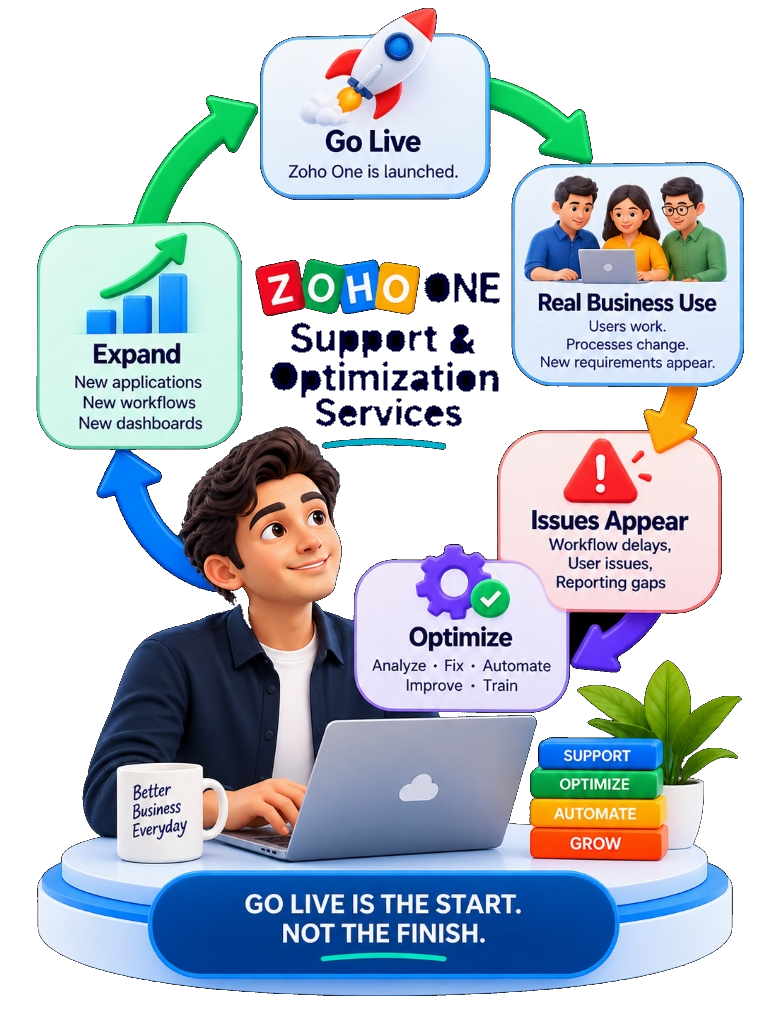
Your Zoho One implementation should improve as your business changes. NuageCX helps businesses manage, troubleshoot, optimize and expand their Zoho One environment after go-live.

Zoho Premium
Authorized Partner
100+ Projects
Delivered Globally
16+ Industries
Domain Expertise
8+ Years
Ecosystem Focus
Zoho One support and optimization services for ongoing business system improvement
VISUAL STORYTELLING

The Post-Go-Live Continuous Improvement Cycle

Go-live is the start, not the finish line. Click through the frames to see how support turns operational friction into business expansion.

FRAME 1: GO LIVE

Zoho One is launched.

Initial system deployment is complete. Baseline workflows and users are live.

CYCLE PRINCIPLEGO LIVE IS THE START.
NOT THE FINISH.
DEFINING POST-GO-LIVE CARE

What Is Zoho One Support?

DIRECT ANSWER

Zoho One support helps organizations maintain, troubleshoot and improve their Zoho environment after implementation.

User & access administration
Workflow troubleshooting
Configuration changes
Automation improvements
Integration support
Dashboard & reporting changes
Application expansion
Data issues resolution
Process reviews
Technical troubleshooting
Ongoing optimization
KEY MESSAGE

Support keeps the system working. Optimization makes the system work better as the business evolves.

Post-Go-Live Life CycleNuageCX Support Standard
REACTIVE SUPPORT
Fixing bugs, user access, sync errors
Baseline
PROACTIVE OPTIMIZATION
Simplifying workflows, auto-refactoring, training
Value Add

Without continuous optimization, system adoption degrades over time as workarounds accumulate.

BUSINESS EVOLUTION

Why Does Zoho One Need Ongoing Optimization?

Your business changes continuously. A system configured at go-live will gradually misalign if not updated alongside operational shifts.

YOUR BUSINESS CHANGES

  • New employees join the organization
  • Departmental structures & roles change
  • New approval rules & governance appear
  • Customers expect different service speed
  • Processes become more complex
  • New applications are introduced
  • Existing third-party integrations change

WITHOUT OPTIMIZATION

Risk
  • ✕ More workarounds & manual overrides
  • ✕ More manual processes outside Zoho
  • ✕ Unused & wasted Zoho One features
  • ✕ Overly complex, slow workflows
  • ✕ Poor user adoption & frustration
  • ✕ Outdated, inaccurate dashboards

WITH OPTIMIZATION

Outcome
  • ✓ Simpler, streamlined workflows
  • ✓ Better automated task execution
  • ✓ Improved operational visibility
  • ✓ Cleaner administrative governance
  • ✓ Better user adoption & confidence
  • ✓ Continuous system improvement
CORE REALITY

A system that worked well at go-live may not remain optimal one year later.

SCOPE OF CARE

What Can We Support?

Select a service area to inspect specific administration, workflow, integration, and optimization capabilities.

SERVICE AREA 01Zoho One Managed Care

APPLICATION SUPPORT

Zoho One Application Suite

Comprehensive support across all deployed Zoho One applications including CRM, Books, Desk, Projects, Analytics, and People to resolve operational bottlenecks.

INCLUDED CAPABILITIES:
User issue resolution
Feature configuration updates
Cross-app workflow troubleshooting
Application setting tuning
CLARIFYING OPTIMIZATION

What Does Zoho One Optimization Actually Mean?

Optimization is not starting over. It is about maximizing the value, speed, and accuracy of the system you already have.

DIRECT ANSWER

Optimization means reviewing the existing Zoho One environment and improving its workflows, automation, configuration, reporting, integrations and user experience based on current business requirements.

01
Remove Unnecessary Workflows
Purge outdated rules and duplicate triggers
02
Simplify Complex Processes
Shorten multi-step manual approval chains
03
Improve Automation
Refactor custom Deluge scripts & webhooks
04
Fix Broken Integrations
Resolve sync errors and payload mismatches
05
Clean Unused Config
Delete orphaned fields and unassigned layouts
06
Improve Dashboards
Align metrics with executive KPI goals
07
Review User Permissions
Enforce principle of least privilege
08
Improve Adoption
Conduct targeted user retraining sessions
09
Add New Workflows
Automate newly introduced business policies
010
Introduce Zoho Apps
Activate unused Zoho One titles seamlessly
KEY MESSAGE: Optimization is about improving the system you already have.
DIAGNOSTIC TARGETS

What We Optimize

We evaluate 9 core dimensions of your live Zoho One environment to pinpoint hidden friction points.

WORKFLOWSTarget 1

Are processes unnecessarily complex?

Audited during diagnostic review
AUTOMATIONTarget 2

Are employees still doing work the system could handle?

Audited during diagnostic review
DATATarget 3

Are duplicate or inconsistent records affecting operations?

Audited during diagnostic review
INTEGRATIONSTarget 4

Are systems exchanging the right information?

Audited during diagnostic review
REPORTINGTarget 5

Can management get the information they need?

Audited during diagnostic review
USERSTarget 6

Do employees know what to do?

Audited during diagnostic review
PERMISSIONSTarget 7

Does each user have appropriate access?

Audited during diagnostic review
APPLICATIONSTarget 8

Are you using the right Zoho applications?

Audited during diagnostic review
GROWTHTarget 9

Can the system support the next stage of the business?

Audited during diagnostic review
METHODOLOGY

Our Zoho One Support & Optimization Framework

Presented as a continuous circular journey that guarantees your system evolves alongside your operational growth.

01 — ASSESS

Review Environment

Comprehensive audit of current configuration and user logs.

Cycle Node 1
02 — IDENTIFY

Pinpoint Friction

Find bottlenecks, manual steps, unused features & sync errors.

Cycle Node 2
03 — PRIORITIZE

Triage Actions

Separate critical fixes, quick wins & future enhancements.

Cycle Node 3
04 — IMPROVE

Execute Refactoring

Implement configuration changes, workflow updates & automation.

Cycle Node 4
05 — VALIDATE

Rigorous Testing

Validate users, data, workflows, permissions & reporting.

Cycle Node 5
06 — TRAIN

User Enablement

Conduct targeted training to explain important process updates.

Cycle Node 6
07 — MEASURE

Quantify Impact

Verify whether changes improved the intended business process.

Cycle Node 7
08 — REPEAT

Continuous Evolution

Re-enter assessment as business requirements continue evolving.

Cycle Node 8
CIRCULAR GOVERNANCE

Repeat the cycle quarterly to maintain peak system health and ROI.

SYSTEM GOVERNANCE

Zoho One Administration Support

Good administration is part of long-term system health. We take over administrative maintenance to safeguard data security and permission integrity.

User Management
Roles Setup
Profiles Configuration
Application Access
Service Administrators
Security Settings
Audit Logs Review
Organization Settings
Application Admin
OFFICIAL CAPABILITY CITATION

Zoho One provides centralized administration features, including role and permission management and audit logs that record organizational activity. ([zoho.com](https://www.zoho.com/one/plan-details.html))

Audit & TroubleshootingAudit Log Analysis
AUDIT TRAIL CAPABILITY

Zoho One audit logs show who made changes, what was changed and when, supporting rapid troubleshooting and administrative review. ([help.zoho.com](https://help.zoho.com/portal/en/kb/one/admin-guide/reports/audit-logs/articles/view-audit-logs-zo))

User Role Change AuditTracked
App Permission RevocationTracked
Security Log MonitoringLive
KEY MESSAGE: Good administration is part of long-term system health.
PROCESS REFACTORING

Zoho One Workflow Optimization

Common problems include too many workflow rules, duplicate automations, manual approvals, and unclear ownership. Here is how we streamline them.

CURRENT WORKFLOWREMOVE UNNECESSARY STEPSSTANDARDIZEAUTOMATETESTMEASURE
BEFORE OPTIMIZATIONFriction Points
Lead Received
Manual Lead Assignment
Manual Email Sent
Manual Task Creation
Spreadsheet Duplicate Update
Result: 45 minutes lead response time + risk of lost leads.
AFTER NUAGECX OPTIMIZATIONAutomated
Lead Received
Business Round-Robin Rule
Instant Owner Assignment
Auto Task & Email Created
Real-Time Mobile Notification
Result: Instant response + 0 spreadsheet reliance.
KEY MESSAGE: Automation should simplify the process, not make the process harder to understand.
INTERACTIVE SCORECARD

Zoho One Automation Health Check

Assess your live environment across 7 operational parameters to receive an instant friction score.

1. How many manual steps exist in core workflows?
2. How many workflow rules trigger the process?
3. How many exceptions require human intervention?
4. How reliably do connected systems exchange data?
5. How often do workflow errors occur?
6. How long does standard process execution take?
7. How often do users bypass the system with spreadsheets?
AUTOMATION SCORECARDCalculated Output
ASSESSMENT RESULT
MEDIUM COMPLEXITY
RECOMMENDED ACTION

Optimize priority workflows. Friction is building in core automation and reporting functions.

ECOSYSTEM CONNECTIVITY

Zoho One Integration Support

When integrations fail, data synchronization stops. We diagnose and repair API payloads, webhooks, and third-party software connectors.

Integration Troubleshooting
API Troubleshooting
Data Synchronization
Workflow Failures
Authentication Issues
Field Mapping Fixes
Error Handling Setup
Third-Party App Changes
ZOHO FLOW CAPABILITY

Zoho Flow provides execution history, manual and automatic rerun capabilities, debugging support and error-handling options that assist with troubleshooting workflow failures. ([zoho.com](https://www.zoho.com/one/plan-details.html))

TROUBLESHOOTING FLOW
ISSUELOGIDENTIFYREPRODUCEFIXTESTDEPLOYMONITOR
ROOT CAUSE RESOLUTION

Integration support should solve both the immediate problem and the reason it happened.

BUSINESS INTELLIGENCE

Zoho One Reporting & Dashboard Optimization

Solve common problems like duplicate dashboards, manual reporting, outdated KPIs, and inconsistent cross-functional numbers.

SALES VIEW
OPTIMIZED KPIS:
Pipeline Velocity
Win Rate
Deal Revenue
FINANCE VIEW
OPTIMIZED KPIS:
Realized Revenue
Accounts Receivable
Cash Flow Forecast
OPERATIONS VIEW
OPTIMIZED KPIS:
Project Status
Resource Utilization
SLA Delivery Rate
MANAGEMENT VIEW
OPTIMIZED KPIS:
Consolidated Revenue
Profitability
Growth & Performance
CHANGE MANAGEMENT

Zoho One User Adoption Support

Technology fails when users work around it.

COMMON FAILURE SIGNS:
  • ⚠️ Employees maintain private spreadsheets
  • ⚠️ Users avoid standard Zoho workflows
  • ⚠️ Information is stored outside the central system
  • ⚠️ Teams use inconsistent operational processes
  • ⚠️ Management reports are incomplete due to missing entries
SUPPORT ADOPTION APPROACH
Understand ProblemSimplify WorkflowTrain UserDocument ProcessMeasure AdoptionImprove
KEY MESSAGE: Sometimes the problem is not configuration. It is the user experience.
TAILORED CARE

Zoho One Support by Business Stage

Select your current business stage to review target support focus areas.

NEWLY IMPLEMENTEDTarget Support Profile

Right after go-live, the priority is smoothing out user transition, resolving post-implementation hiccups, and establishing system stability.

PRIORITY SUPPORT FOCUS:
Stability & Bug Fixes
Initial User Adoption & Support
Issue Resolution SLAs
Post-Go-Live User Training
DIAGNOSTIC TRIGGERS

When Should You Request a Zoho One Health Check?

If your organization experiences any of these 10 symptoms, a structured environment audit is strongly recommended.

SYMPTOM 01

Users report recurring problems

SYMPTOM 02

Workflows are hard to manage

SYMPTOM 03

Employees maintain spreadsheets

SYMPTOM 04

Management reports are inconsistent

SYMPTOM 05

Integrations fail frequently

SYMPTOM 06

Added new business departments

SYMPTOM 07

Core business processes changed

SYMPTOM 08

Implemented new Zoho apps

SYMPTOM 09

Accumulated years of custom code

SYMPTOM 010

Unsure if automations are needed

COMPARISON MATRIX

Zoho One Support vs Optimization

Understanding the critical distinction between maintaining system operational state vs driving business process improvement.

SUPPORT (MAINTENANCE)

Keep Running
  • ✓ Fix technical issues & errors
  • ✓ Restore broken functionality
  • ✓ Answer day-to-day user questions
  • ✓ Troubleshoot workflow execution failures

OPTIMIZATION (EVOLUTION)

Keep Improving
  • ✓ Streamline & simplify core processes
  • ✓ Remove redundant workflow complexity
  • ✓ Increase automated task coverage
  • ✓ Improve executive reporting & visibility
  • ✓ Elevate user adoption & confidence
  • ✓ Prepare system architecture for growth
ONE-LINE DIFFERENCE: Support keeps the system running. Optimization keeps the system improving.
ENGAGEMENT OPTIONS

Flexible Zoho One Support Models

Choose the service structure that aligns with your internal team size and technical requirements.

MODEL 1

ON-DEMAND SUPPORT

For businesses that need expert assistance when specific technical issues occur.

MODEL 2

MONTHLY SUPPORT

For businesses that want ongoing access to support hours and routine improvements.

MODEL 3

MANAGED OPTIMIZATION

For businesses that want regular reviews of workflows, automation, reporting & system health.

MODEL 4

PROJECT-BASED IMPROVEMENT

For specific automation, integration, reporting, customization or new app rollouts.

Note: NuageCX customizes support plans, response times, and SLAs based on formally agreed scope.

PRICING TRANSPARENCY

What Does Zoho One Support Cost?

DIRECT ANSWER

Zoho One support cost depends on the support model, number of applications, users, business complexity, technical requirements and level of ongoing optimization required.

CORE COST DRIVERS:
Number of applications
Number of users
Support frequency
Number of workflows
Integration complexity
Customization level
Reporting requirements
Expected SLA response
Support hours allocated
Optimization scope
View Full Zoho One Pricing Guide →
VALUE REALIZATION

Routine Administration vs Complex Ecosystem Support

Simple user password resets and single-app user permissions require basic administration models. Multi-application environments with custom Deluge code and live ERP integrations require specialized technical support hours.

We tailor your plan to eliminate wasted budget while guaranteeing instant technical coverage when needed.
SLA CHECKLIST

What Should a Zoho One Support Agreement Include?

A comprehensive support agreement protects system stability and clarifies scope boundaries.

Supported Applications
Support Hours
Response Expectations
Issue Classification
Troubleshooting
Configuration Changes
Workflow Support
Integration Support
Reporting Support
User Support
Escalation Process
Optimization Reviews
Documentation
Knowledge Transfer
Important: NuageCX publishes only verified, agreed SLAs and support hours in formal contracts.
PROVEN TRACK RECORD

Real NuageCX Zoho Experience

Explore how NuageCX optimizes multi-application Zoho environments across diverse industries.

NEEVIQProjects + Books

Project & Financial Flow Optimization

Streamlined project workflows, automated timesheets, resource utilization tracking, invoicing, and management reporting.

Read the Case Study →
MEGA ENGINEERINGCreator + Books

Procurement & Operations Integration

Optimized custom procurement workflows, operational job cards, and financial data connectivity between custom Creator apps and Books.

Read the Case Study →
ENGINEERING SOLUTIONSCreator + Books

Workflow Digitization & Finance Sync

Digitized manual shop-floor operations, streamlined procurement triggers, and established automated finance coordination.

Read the Case Study →
OUR DIFFERENCE

Why Choose NuageCX for Zoho One Support?

6 core pillars that separate business-centric optimization from simple ticket handling.

PILLAR 01

BUSINESS CONTEXT

We understand the business process behind the configuration, not just technical settings.

PILLAR 02

ZOHO ECOSYSTEM

Support considers multiple connected Zoho apps rather than treating each application in isolation.

PILLAR 03

IMPLEMENTATION CONTINUITY

Support seamlessly maintains original implementation architecture created by NuageCX.

PILLAR 04

CUSTOMIZATION AWARENESS

We understand custom Deluge functions, Creator widgets, and business-specific code.

PILLAR 05

INTEGRATION AWARENESS

We investigate issues across Zoho and connected third-party systems seamlessly.

PILLAR 06

OPTIMIZATION MINDSET

We do not only fix what is broken. We proactively identify what can be improved.

Zoho Premium
Authorized Partner
100+ Projects
Delivered
16+ Industries
Covered
8+ Years
Experience
FREQUENTLY ASKED QUESTIONS

Zoho One Support Questions

SELF DIAGNOSTIC

Is Your Zoho One Environment Still Working the Way Your Business Needs?

Check all operational challenges currently experienced by your team:

DIAGNOSTIC STATUS
STABLE

Your system appears structurally stable. Continue monitoring.

GET STARTED

Keep Zoho One Aligned With Your Business

Your business will change. Your Zoho environment should change with it. NuageCX helps you fix issues, improve workflows, optimize automation, support users, maintain integrations, improve dashboards, add applications, and prepare for growth.

Fix operational issues & sync failures
Improve workflow velocity & clarity
Optimize Deluge & automated triggers
Provide continuous user enablement
Maintain stable third-party integrations
Build executive KPI dashboards
Expand to new Zoho One applications
Conduct structured quarterly system health reviews

Get My Zoho One Support & Optimization Plan

Tell us what is changing, what is not working and where your Zoho One environment needs improvement.