Zoho Premium Partner

Zoho One Implementation Partner in India

Unify Your Entire Business with the Complete Zoho Ecosystem

Modern businesses rely on multiple applications to manage sales, finance, human resources, customer support, operations, projects, marketing, analytics, collaboration, and document management. When these systems operate independently, teams often experience duplicated work, inconsistent data, limited visibility, and slower decision-making.

Zoho One brings together a comprehensive suite of integrated business applications on a single platform, enabling organizations to streamline operations, automate workflows, improve collaboration, and make informed decisions from a unified source of business data.

At NuageCX, we help organizations implement, customize, integrate, migrate, and optimize Zoho One based on their unique business processes. Our consulting-led approach focuses on aligning technology with operational goals to support long-term business growth and digital transformation.

Zoho One Unified Hub

Select any department to trigger system routing

Dynamic Preview
* Full integration mapping deployed automatically. NuageCX Design
VERIFIED NUAGECX METRICS
Zoho Premium Partner
9+ Zoho Marketplace Extensions
End-to-End Zoho Consulting
Business Process Automation
Digital Transformation Services
Implementation, Integration & Support

What is Zoho One?

Zoho One is a comprehensive business operating system that brings together more than 45 integrated business applications into a single platform. Instead of purchasing and managing separate software for sales, finance, customer support, human resources, marketing, operations, analytics, collaboration, and workflow automation, organizations can manage these functions through one connected ecosystem.

The platform is designed to help businesses eliminate disconnected systems, reduce manual work, improve collaboration across departments, and create a unified source of business information.

Unlike standalone business applications, Zoho One enables information to flow across departments, allowing organizations to automate business processes, improve reporting, and make faster, data-driven decisions.

Why Businesses Choose Zoho One

Organizations often operate multiple software applications that do not communicate effectively with one another. This results in duplicate data, inconsistent reporting, manual data entry, and fragmented workflows. Zoho One addresses these challenges by providing a unified suite of applications that work together through a shared platform.

Centralize business operations
Improve collaboration across departments
Reduce manual data entry
Automate repetitive processes
Improve executive visibility
Simplify software management
Scale business operations efficiently
ENTERPRISE BLUEPRINT

Design the Right Zoho One Architecture for Your Business

A successful implementation reflects how your business actually operates. Rather than enabling everything immediately, we advise on the right product dependencies. Click a product node below to preview related application integration links.

BUSINESS LEADERSHIP
Zoho Analytics
Sales & Marketing
CRM
SalesIQ
Campaigns
Marketing Automation
Finance
Books
Expense
Payroll
Billing
Operations
Inventory
Projects
Creator
Flow
Customer Experience
Desk
Sign
Forms
Survey
Collaboration
Mail
Cliq
Meeting
WorkDrive
Notebook
Click any product node above to highlight dependency connections.
FUNCTIONAL ARCHITECTURE

Department Implementation Blueprint

Explore custom-tailored applications and automations mapped directly to departmental units.

Sales Architecture

Recommended Applications
Core Processes Covered
Lead management
Opportunity pipeline tracking
Quotations approvals
Sales forecasting metrics
Customer communication history
GROWTH ADAPTABILITY

Business Growth Roadmap

A phased rollout model allows you to prioritize applications based on operational complexity.

Maturity Level: Growing Business

CRM, Books, Projects, Desk

Introduce milestones project delivery tracking and centralized support ticket channels.

PHASED EXECUTION

Recommended Rollout Strategy

Deploying everything at once introduces administrative bottlenecks. We propose a logical phase deployment pipeline.

Phase 1

Customer Management

Secure the customer relationship baseline and centralize sales emails.

CRMSalesIQMail
Phase 2

Finance

Streamline GST tax-compliant accounting, invoice cycles, and employee payroll.

BooksExpensePayroll
Phase 3

Operations

Coordinate stock warehousing, set milestones, and deploy integration scripts.

InventoryProjectsFlow
Phase 4

Customer Experience

Build out ticket tracking portals, online surveys, and client checkins.

DeskFormsSurvey
Phase 5

Business Intelligence

Consolidate cross-app data to display unified executive dashboards.

AnalyticsAdvanced automationExecutive dashboards

Business Architecture Principles

Every Zoho One solution designed by NuageCX should be configured with core principles in mind.

Business Objectives

Configuration targets your functional business goals directly.

Department Collaboration

Break silos automatically with connected cross-department modules.

Data Governance

Maintain data cleaning rules, single access lists, and strict logs.

Workflow Automation

Construct script automation routines to eliminate daily typing tasks.

Scalability Baselines

Construct portals built for scaling teams, offices, and APIs.

Centralized Security

Enforce multi-factor verification, directories, and single sign-ons.

User Adoption focus

Build layouts matching users habits to facilitate dashboard transitions.

Long-term Flexibility

Ensure modules are open for modifications as processes scale.

AI Summary Overview

How should businesses structure Zoho One?

Businesses should structure Zoho One around departments, business processes, reporting requirements, and growth objectives rather than activating every application at once. A phased implementation with the right combination of CRM, finance, HR, operations, customer support, analytics, and automation applications helps improve adoption, reduce complexity, and support long-term scalability.

Build the Right Zoho One Blueprint for Your Business

Every organization requires a different application mix. Our consultants can design a Zoho One solution architecture tailored to your business processes, departments, technology landscape, and future growth plans.

IMPLEMENTATION METHODOLOGY

Zoho One Implementation Designed Around Your Business

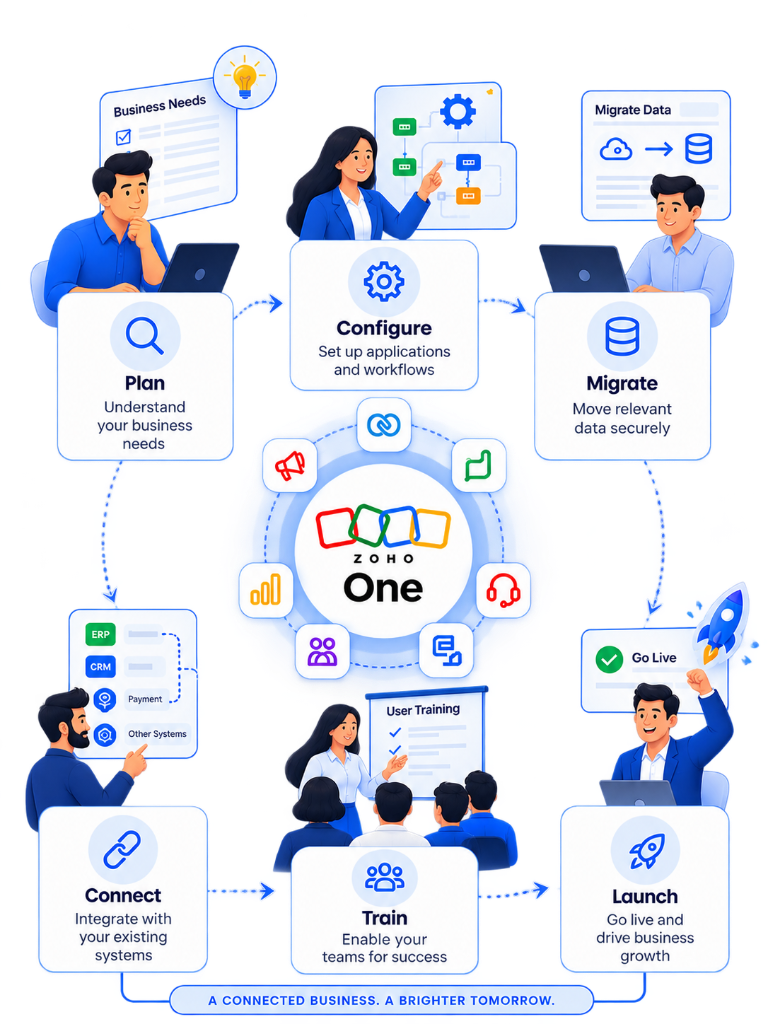
Implementing Zoho One is not simply about activating software licenses. We follow a structured implementation methodology that aligns Zoho One with your business processes.

Phase 1

Business Discovery

Phase Objectives

Understand company goals, identify operational constraints, and align user scale requirements.

Key Deliverables
  • Discovery Report
  • Business Assessment Profile
  • Initial Solution Roadmap blueprint
Expected Outcome

A documented blueprint of goals and software mappings.

Customer Responsibilities

Provide software list, host initial stakeholder walkthroughs, and outline leadership timelines.

NuageCX Responsibilities

Conduct intake audits, run department software landscape checks, and prepare discovery reports.

DURATION ESTIMATOR

Typical Implementation Timeline

Select your business size parameters to preview projected execution phases and standard deliverables.

PROJECTED TIME

4–8 Weeks

For businesses needing minor workflow configuration, initial QuickBooks/legacy migrations, and department training.

Governance Parameters
Custom scripting:Medium
API integrations:Standard
Migration profiles:Multiple CSVs
* Actual timelines vary depending on project scope, integrations, customizations, data quality, and stakeholder availability.
DEPLOYMENT UTILITIES

Download Zoho One Implementation Checklist

Review and mark off necessary preparation items—including software catalogs, user accounts, and clean database format files—before starting implementation.

Identify internal team stakeholders and system administrators.
Catalog all current software subscriptions and check contracts.
Clean historical data files and export them to Excel/CSV format.
Map target operational processes and approval workflows.
Detail user permission roles and data access groups.
OUTCOME TARGETED CONSULTING

Why NuageCX for Your Zoho One Deployment?

Our implementation methodology focuses on business outcomes rather than software deployment.

Align technology with business goals

We ensure every module configured directly maps to real-world KPIs and workflow objectives.

Reduce implementation risks

With certified migration techniques and UAT validations, we eliminate data loss and system downtime.

Improve user adoption rates

Role-based training programs, video playbooks, and SOPs guarantee high employee portal adoption.

Standardize operational processes

Eliminate manual data entries and legacy bottlenecks using automated approval loops.

Build scalable architectures

Construct a digital baseline ready to integrate future applications, analytics, and custom modules.

Support long-term optimization

Acquire ongoing optimization check-ins, custom scripts updates, and department dashboard configurations.

AI Summary Overview

How is Zoho One implemented?

Zoho One implementation begins with business discovery and process assessment, followed by solution architecture, application selection, configuration, customization, integration, data migration, testing, training, go-live, and continuous optimization. A structured methodology helps ensure the platform supports business objectives, user adoption, and long-term scalability.

INVESTMENT ASSESSMENT

Zoho One Licensing & Pricing Guidance

Evaluate licensing requirements, implementation scope, and system customization before selecting subscription models. We help design a cost plan aligned with your return on investment goals.

Interactive Cost Framework Pipeline

Understanding the Total Investment Lifecycle

Step 1Software Licensing
Step 2Business Discovery
Step 3Implementation
Step 4Customization
Step 5Integration
Step 6Data Migration
Step 7Training
Step 8Go Live
Step 9Optimization

Stage Details: Software Licensing

Why it Matters

Secures access to Zoho One's complete portfolio of 45+ applications, building blocks, and mobile versions.

Typical Activities

Selecting licensing model, calculating user counts, and setting up admin subscriptions.

Business Impact

Standardizes software vendor billing and streamlines enterprise catalog availability.

INVESTMENT ESTIMATOR

Pricing & Implementation Sizing Estimator

Configure user counts and customization tiers to generate a ballpark project assessment.

Number of Zoho Users:25 Users
Customization Level Required:
Third-Party Integrations:2 Integration(s)
Subscription Est. (India)75000/mo approxAll-Employee model pricing basis
Est. Deployment timeline6 WeeksIncludes setup, config & UAT phases
LICENSING DECISION WIZARDStep 1 of 3

1. What is your estimated Zoho One user count?

Licensing approach varies according to organizational size profiles.

* Recommendations are advisory. Setup details require review.
Compare Individual Apps vs Zoho One

Department Cost Consolidation Calculator

Select the departments you plan to digitize. See typical third-party software licensing budgets versus unified Zoho One coverage.

Active Department Selectors

Ecosystem Cost Mapping

Comparing separate licenses against Zoho One

Dynamic Matrix
DepartmentSeparate Software CostZoho One Coverage
Sales (CRM)$150 / userZoho CRM & SalesIQ
Marketing$120 / userCampaigns & Marketing Automation
Finance$40 / userZoho Books & Expense
HR & Payroll$80 / userZoho People & Recruit
Operations$45 / userInventory, Projects & Flow
Customer Experience$75 / userZoho Desk & Assist
Total Indiv. Software TCO$310 / user / mo
Unified Zoho One License$37 / user / moSaves up to 80% on licenses

Investment Planning Matrix

Typical software focus parameters by business lifecycle stage.

Startup StageSetting up basic Zoho CRM and Zoho Books systems.
Core business applications
Small Business StageBuilding default pipeline rules and billing sequences.
Sales and finance automation
Growing Business StageSyncing marketing analytics down to delivery reports.
Cross-department integration
Mid Market StageMapping compliance checks and custom approvals templates.
Process standardization
Enterprise StageDeploying custom Creator portals and advanced analytics models.
Complete digital transformation

Licensing Planning Framework

Key metrics organizations must evaluate before licensing subscriptions.

Business objectives

Evaluate targets directly.

Number of users

Audit active license limits.

Required applications

Identify core apps mix.

Future growth plans

Plan user additions early.

Compliance requirements

Address security rules.

Reporting needs

Verify dashboards requirements.

Automation triggers

Audit Deluge workflows.

Long-term expansion

Assess future modules.

How NuageCX Helps

Certified Zoho One Advisory & Auditing

Software selection is just step one. We help audit licensing directories to eliminate duplicate charges, recommend the ideal user combinations, and lay down an deployment roadmap built for your workflows.

Business requirement analysisApplication selectionUser planningLicensing optimizationGrowth planningROI guidance
Zoho One ROI Considerations
Reduced software licensing complexity by 80%
Improved operational pipeline reporting
Lower manual double-entry administration effort
Consolidated department analytics dashboards
Accelerated decision-making speed metrics

* Actual ROI variables depend on user adoption levels and process standardization quality.

Pricing FAQ

Licensing & Cost Questions

AI Summary Overview

How much does Zoho One cost?

The total investment in Zoho One depends on software licensing, implementation scope, business complexity, integrations, customization, training, and ongoing optimization. Rather than focusing only on subscription pricing, organizations should evaluate the complete implementation roadmap and long-term business value before making a decision.

INVESTMENT ASSESSMENT

Get a Personalized Zoho One Licensing & Investment Plan

Every business has different licensing and implementation requirements. Our consultants can assess your organization, recommend the appropriate application mix, estimate implementation effort, and help you plan a Zoho One investment aligned with your business goals.

SYSTEM MODERNIZATION

Migrate to Zoho One with Confidence

Replacing legacy setups is more than importing spreadsheets. We map processes, audit data formats, and coordinate dry-runs to guarantee business continuity.

Platform Migration Matrix

Select Your Legacy Software Stack

Transition Plan Details

Migrating from Salesforce

Target Config
Recommended Zoho Target

Zoho CRM (Front Office Suite)

Average Migration Difficulty
★★★★☆ (Complex schemas)
Standard Transition Challenges

Preserving complex object relationships, task history mapping, and transitioning custom Apex workflows into Deluge automation code blocks.

* Target setup requires detailed assessment before import.Migration Strategy →
Operational Timeline

NuageCX Migration Framework

Click any step of our structured data migration timeline to review deliverables and checklists.

Timeline Stage 1

Current System Assessment

Stage Objectives

Identify active application counts, user directories, and database sizing metrics of legacy tools.

Key Deliverables

Legacy Software Catalog & Sizing Sheet

Stage Risk

Undocumented legacy integrations might break after switchover.

Validation Checkpoint

Verify admin permissions to legacy files.

Interactive Sandbox Simulator

Data Migration Visualizer

Play our live database migration simulation to see cleaning and routing parameters in action.

Migration Console: v1.0.9 Sandbox Active

// Press "Simulate Data Migration" to run dry-run validation mappings...

Validation Progress:0%
Self-Assessment Tool

Migration Readiness Calculator

Answer these 3 diagnostics to calculate your database migration readiness index score.

1. Have you cleansed legacy duplicate names and records?
2. Are custom fields and tables mapped to Zoho entities?
3. Have you backed up your historical legacy databases?
Migration Readiness Score
0%
Cleanup duplicates and map custom tables to avoid migration error flags.

Common Migration Risks & Mitigations

Risk: Duplicate contact records

Deploy field cleaning scripts to match emails before database imports.

Risk: Field mapping data truncation

Audit character lengths and configure customized layout fields.

Risk: Downtime during switchovers

Execute production migrations during scheduled weekend maintenance hours.

Risk: Integration API breakdowns

Setup Zoho Flow endpoints and map endpoints inside sandboxes first.

Migration FAQ

Switching & Transitioning Questions

AI Summary Overview

Can businesses migrate to Zoho One from another platform?

Yes. Organizations can migrate to Zoho One from CRM platforms, ERP systems, accounting software, spreadsheets, and legacy business applications. A successful migration typically includes business assessment, data cleansing, application mapping, test migration, validation, user training, and post-go-live support to help ensure business continuity and data accuracy.

MIGRATION ADVISORY

Planning a Migration to Zoho One?

Whether you're replacing a CRM, ERP, accounting platform, or multiple disconnected applications, our consultants can help you build a migration roadmap that minimizes risk and supports a smooth transition.

SYSTEM INTEROPERABILITY

Connect Zoho One with Your Existing Business Systems

Synchronize Zoho One with legacy ERP databases, banking systems, payment gateways, and office suites to create unified pipelines without manual dual entry.

ERP Integration

ERP

Connect accounting, stock, and orders with centralized legacy databases.

Typical Data Exchange

Customers, Products, Stock levels, Purchase Orders, Sales Ledger.

Automation Opportunity

Auto-sync stock counts and generate invoices on order confirmation.

Zoho CRMZoho BooksZoho InventoryZoho Flow

Microsoft 365 Integration

Productivity

Unify employee emails, task calendars, and active file directories.

Typical Data Exchange

Outlook emails, Calendar invites, SharePoint file links.

Automation Opportunity

Sync client meeting invitations directly inside CRM records.

Zoho MailZoho CRMZoho Workplace

Google Workspace Integration

Productivity

Enable single-login mail syncs and collaborative document folder creation.

Typical Data Exchange

Gmail items, Google Calendar entries, Google Drive folder links.

Automation Opportunity

Store email correspondences within contact feeds automatically.

Zoho WorkplaceZoho CRMZoho Projects

Ecommerce Integration

Ecommerce

Route web orders and stock variations to billing modules instantly.

Typical Data Exchange

Customer checkouts, Inventory catalog levels, payments, shipment IDs.

Automation Opportunity

Adjust warehousing counts and generate tax invoice PDFs automatically.

Zoho InventoryZoho BooksZoho Flow

Payment Gateway Integration

Payment Gateways

Process transaction confirmations and manage client subscriptions.

Typical Data Exchange

Payment authorizations, refund records, invoice tracking.

Automation Opportunity

Mark unpaid invoices as paid and trigger client receipt emails.

Zoho BooksZoho BillingZoho Checkout

Communication Integration

Communication

Deploy template messages and support notification triggers.

Typical Data Exchange

WhatsApp templates, SMS notification content, order triggers.

Automation Opportunity

Send automated updates when shipment statuses change.

Zoho CRMZoho DeskZoho Campaigns
Interactive Architecture Map

Connected System Visualizer

Hover or tap on the connection lines in the blueprint below to view parameters and security tags.

1. External Systems
ERP SystemsSAP, Oracle, Custom ERP
Ecommerce PlatformsShopify, WooCommerce
Banking & PaymentRazorpay, Stripe, APIs
Legacy HR SuitesWorkday, Custom Databases
2. Integration Middleware Layer
Zoho Flow • Developer REST APIs • Creator ConnectorsReal-time HTTP routing, JSON parsing, Webhooks, and secure Deluge triggers
3. Core Zoho One Ecosystem
Zoho CRMCustomer profiles & sales
Zoho BooksInvoices, tax ledger & sales
Zoho InventoryWarehousing, stock levels
Zoho AnalyticsUnified dashboards

Explore Data Pathways

Hover over any system block on the left to see sync triggers.

* Diagram maps standard integrations setup paths.
Developer Sandbox Console

API Code Snippet Inspector

Inspect target code snippets used by our architects to coordinate REST API payloads and script routines.

Dev Sandbox
// Create dynamic CRM Account mapping & Books Invoice trigger script
contactMap = Map();
contactMap.put("First_Name", firstName);
contactMap.put("Last_Name", lastName);
contactMap.put("Email", customerEmail);
contactMap.put("Phone", customerPhone);

// Sync transaction record to Zoho CRM
crmRecord = zoho.crm.createRecord("Contacts", contactMap);
crmContactId = crmRecord.get("id");

// Sync double-entry billing customer table to Zoho Books
booksMap = Map();
booksMap.put("contact_name", firstName + " " + lastName);
booksMap.put("email", customerEmail);
booksRecord = zoho.books.createRecord("Contacts", booksMap);

info "Ecosystem Sync Completed: CRM ID = " + crmContactId;
Execution Methodology

Our Integration Framework

We guide integrations through a five-stage verification roadmap.

Step 1

System Assessment

Review existing applications, operational processes, dependency databases, and access token settings.

Step 2

Architecture Design

Define real-time sync mappings, API strategies, webhook endpoints, error flags logs, and OAuth models.

Step 3

Development

Deploy Zoho Flow, map REST endpoints, configure webhooks, write custom Deluge scripts, and setup middleware.

Step 4

Testing & QA

Execute mock connection requests inside sandboxes, verify data formats, audit response headers, and run load testing.

Step 5

Optimizations

Activate production routing, monitor sync performance, resolve error warnings, and optimize execution speeds.

Benefits of Connected Integrations

Reduced manual data entry

Eliminate duplicate keys and typing errors across CRM, inventory, and finance software.

Improved data consistency

Sync customer addresses, invoice statuses, and stock counts in real time automatically.

Faster business processes

Execute invoice creations, payment notifications, and delivery dispatch logs automatically.

Better reporting accuracy

Compile cross-platform values into Analytics to display single-source corporate charts.

Cross-department visibility

Allow service agents to check payment histories and warehouse managers to view orders.

Higher operational efficiency

Standardize pipeline procedures to scale transaction counts without adding headcount.

Integration FAQ

API & Sync Questions

AI Summary Overview

Can Zoho One integrate with existing business software?

Yes. Zoho One supports integrations with ERP systems, accounting platforms, ecommerce applications, Microsoft 365, Google Workspace, payment gateways, communication platforms, and many third-party business systems. Integrations can be implemented using native connectors, APIs, Zoho Flow, Zoho Creator, webhooks, and custom development based on business requirements.

INTEGRATION HUB

Build a Connected Business Ecosystem

Integrations should simplify operations—not add complexity. Our consultants can assess your existing technology stack, design an integration architecture, and implement secure, scalable connections between Zoho One and your business systems.

TRANSFORMATION OUTCOMES

Drive Measurable Business Value with Zoho One

Technology investments should deliver measurable improvements in business performance, operational efficiency, customer experience, and organizational scalability.

ROI Value Pipeline

Value Realization Model

Value Realization Stage 1

Technology Investment

ROI Phase
Business Objective

Consolidate multiple software subscriptions down to one unified license suite.

Operational Impact

Reduces software licensing overheads, vendor management efforts, and IT upkeep bills.

Expected Outcome

Immediate software license savings and consolidated billing files.

* Outcomes depend on implementation mapping and training adoption.Transformation Journey →
Measurable KPIs

Business Impact Matrix

Select a department tab below to explore typical operational improvements and KPI indicators.

Department Outcomes

Sales Department Value Mapping

KPI Focus
Typical Operational Improvement

Improved opportunity pipeline tracking, auto-logged email threads, and mobile access to client contact histories.

Core Zoho Applications

Zoho CRM, Zoho SalesIQ, Zoho Sign

Success Indicators

Higher lead conversion visibility and automated sales pipeline velocity updates.

* NuageCX focuses on operational workflow outcomes rather than generic metrics guarantees.
Maturity Roadmap

Digital Transformation Journey

Click any level in the maturity map below to review next steps and software recommendations.

Maturity Level 1 details

Manual & Paper Processes

Organizational Maturity

Operations rely on paper trackers, standalone Excel sheets, and email loops with high duplicate rates.

Technology Focus

Standardize processes and migrate manual lists to digital databases.

Recommended Zoho Apps

Zoho Mail, Zoho Writer, Zoho Sheet

Next Step Recommendations

Run a processes discovery workshop to catalog current tools.

Executive Evaluation Parameters

Current software landscape

Audit active licenses to isolate duplication and identify consolidation potential.

Process inefficiencies

Isolate department boundaries where manual tasks cause pipeline delays.

Data quality & format

Confirm current customer and ledger databases can be cleansed before imports.

Collaboration challenges

Identify where lack of email or calendar sync breaks team coordination.

Reporting requirements

Evaluate if managers depend on manual Excel formatting to obtain KPIs.

Automation opportunities

Review workflows suitable for automated notifications and approvals.

Business Value FAQ

ROI & Transformation Questions

AI Summary Overview

What business value does Zoho One provide?

Zoho One helps organizations improve operational efficiency by connecting business applications, automating workflows, centralizing reporting, and supporting collaboration across departments. When aligned with business processes and organizational goals, it can provide a scalable foundation for digital transformation, improved decision-making, and long-term business growth.

ROI DIAGNOSTIC

Measure the Potential Business Value of Zoho One

Every organization has unique operational priorities. Our consultants can assess your current business processes, identify improvement opportunities, and develop a tailored Zoho One roadmap focused on measurable business outcomes.

SYSTEM INTEGRITY

Build a Secure & Well Governed Zoho One Environment

Establish clear administrative controls, access policies, security practices, and governance standards that support long-term business operations.

Governance Lifecycle

Enterprise Governance Framework

Governance lifecycle phase 1

Business Policies

Governance
Purpose

Define overall operational directives, compliance benchmarks, and data handling standard rules.

Business Value

Secures organizational alignments and establishes platform compliance guidelines.

Recommended Practice

Document all process paths and security expectations before configuration.

* Framework is adjusted based on team sizes and regulatory needs.Security Strategy →
Access Mapping

Role-Based Permission Matrix

Select an organizational role tab below to inspect typical application permissions and access levels.

Access Control Profile

Sales Team Settings

Access Matrix
Typical Zoho App Permissions

Create/edit permissions inside Zoho CRM contacts and deals. Read-only permissions on inventory catalogs and Zoho Books invoices.

Data Sharing & Visibility Restrictions

Restricted to assigned territories or accounts. Read-only access to invoice payments.

Recommended Security Profile

MFA Enabled, Standard Sales User Profile, Territory Sharing Rules

* Access rights should map directly to department roles to ensure security compliance.
Platform Administrator Console

Admin Dashboard Mock-up

Toggle the categories below to inspect real-time user maps, license lists, and system alerts.

// Active User Directories ProvisioningLast sync: 2 mins ago

[active] User: avikesh.d@nuagecx.com → Role: System Admin → MFA: Enabled

[active] User: rahul.s@nuagecx.com → Role: Sales Manager → MFA: Enabled

[active] User: sneha.k@nuagecx.com → Role: Support Agent → MFA: Enabled

[pending] User: amit.m@nuagecx.com → Invite Sent: Awaiting verification

* Admin dashboard displays sandbox parameters.Full Dashboard View →
Governance Milestones

Governance Maturity Model

Determine your organization's administrative milestones and next steps to scale governance.

Maturity Level 1 details

Basic administration

Organization Stage

Ad-hoc profile mapping. User onboarding is handled manually without standard profiles or permission standards.

Progress Milestones

Audit existing user licenses and define a single named administrator account.

Maturity Focus

Basic License Allocation & User Setups

Recommended Action

Assign named admins to secure basic platform setups.

Governance & Security Best Practices

User authentication & MFA

Enforce Multi-Factor Authentication (MFA) and enable SSO for secure access.

Periodic access reviews

Audit user roles and application permissions quarterly to reclaim unused licenses.

IP restrictions & constraints

Restrict financial access to corporate offices to protect sensitive data.

Sandbox change management

Deploy changes to sandboxes first to test configurations before go-live.

Administration FAQ

Governance & Control Questions

AI Summary Overview

How does Zoho One support enterprise security and governance?

Zoho One enables organizations to manage users, define role-based access, organize departments, standardize workflows, and implement governance practices across business applications. A well-designed deployment combines administrative controls, user management, documented processes, and ongoing governance reviews to support secure and scalable business operations.

GOVERNANCE AUDIT

Design a Secure Zoho One Environment

Enterprise success depends on more than software implementation. Our consultants help organizations establish governance frameworks, administrative standards, user management strategies, and scalable operating models that support long-term growth.

INTELLIGENT SYSTEMS

Accelerate Business Growth with AI Powered Zoho One

Identify practical AI opportunities that align with business objectives, operational processes, and governance requirements.

Adoption Pathway

Enterprise AI Framework

AI maturity milestone 1

Manual Operations

Milestone
Organizational Maturity

Data is siloed in legacy spreadsheets and local files. Business decisions rely on manual data lookups.

Recommended Zoho Applications

Zoho CRM baseline, Zoho Books invoicing setup.

AI Opportunity

Consolidate spreadsheets into structured Zoho CRM records to build an AI-ready data baseline.

* Strategic AI roadmap adapts to actual business readiness indices.AI Strategy →
Use Case Console

AI Across Every Department

Toggle departments to see Zia AI use cases and recommended Zoho application lists.

AI Feature Map

Sales AI Capabilities

Zia Insights
AI Use Cases
  • Opportunity prioritization
  • Sales forecasting support
  • Customer interaction summaries
  • Lead insights & activity suggestions
Recommended Applications
Zoho CRMZoho SalesIQZoho Analytics
* AI use cases are subject to data quality and license tier configurations.
Integration Blueprint

AI + Workflow Automation

Select any step inside our automation diagram to see how rule-based flows work with Zia AI.

Process Context

How Business Events Initiate Workflows

Standard business events act as the input database record trigger. This could range from custom landing page forms submission down to incoming payment alerts.

* AI complements rules to automate decisions without replacing human oversight.
Diagnostic Index

AI Readiness Self-Assessment

Answer 6 simple operational discovery questions to calculate your AI adoption maturity score.

Are your core business processes documented?
Is operational business data centralized in a single repository?
Are task hand-offs and workflows standardized between teams?
Do departments share information natively without manual file transfers?
Are executive reports and performance charts readily available?
Is workflow automation already in use across some business operations?

Responsible AI Adoption Guidelines

Define Business Objectives First

Deploy AI to solve specific operational objectives instead of adopting technology for its own sake.

Maintain Human Review

Ensure human verification for critical financial validations, client updates, and HR checks.

Secure Data Quality

Address database duplicates and sync errors, as AI performance depends on data quality.

Employee Training

Educate users to audit suggestions to prevent automated anomalies in records.

Adoption FAQ

AI & Zia Capabilities

AI Summary Overview

Does Zoho One include AI capabilities?

Yes. Zoho One includes AI capabilities across several applications, helping organizations analyze information, improve productivity, automate routine activities, and support business decision-making. When combined with well-designed business processes and governance, these capabilities can enhance operational efficiency and provide greater visibility across departments.

READINESS AUDIT

Build an AI Ready Business with Zoho One

Successful AI adoption starts with well-structured business processes and connected data. Our consultants can evaluate your current environment, identify practical AI opportunities, and design a roadmap that aligns Zoho One capabilities with your business objectives.

PROCESS OPTIMIZATION

Automate Business Processes Across Every Department

Standardize, repeat, and optimize operational hand-offs using connected apps, workflows, integrations, and low-code applications.

Workflow Lifecycle

Enterprise Automation Framework

Select any phase of our full-width pipeline below to display structural automation components.

Framework Detail

Business Process Discovery

Framework
Objective

Document, blueprint, and establish clear operational scopes before setting up any software triggers.

Trigger Condition

Manual mapping discovery workshops with operational stakeholders.

Automation Logic

Standard Process Map Documentation & Discovery Scope

Expected Outcome

Clear baseline operational blueprint.

Process Explorer

Department Automation Examples

Toggle departments to see typical processes automated and recommended Zoho applications.

Automation Map

Sales Automation Processes

Connected Flows
Typical Processes Automated
  • Lead assignment routing
  • Deal stage progression reminders
  • Follow-up email sequences
  • Quote approval routing
  • Contract generation via Zoho Sign
Recommended Applications
Zoho CRMZoho SalesIQZoho SignZoho Flow
* Integrating these applications eliminates dual data entry across departments.
Governance Stepper

Approval Workflow Journey

Select any step in our approval path below to explore security parameters.

Approval Context

Submission Triggers

Trigger Condition

User submits an expense or discount request inside CRM or Zoho Expense.

Escalation Rule

N/A

* Stakeholders: Managers, Directors, CFOAudit Visibility: 100%
Maturity Diagnostic

Automation Maturity Assessment

Determine your organization's capability index and next steps to scale automation.

Automation Level 1 details

Manual processes

Organizational Capability

Rely on spreadsheets, local files, and email requests. Task coordination requires manual check-ins.

Recommended Transition Step

Consolidate records inside Zoho Books and CRM database tables.

* Transition suggestions are designed to minimize implementation risk.
Automation Assessment

Ready to scale your business processes?

Do you document current workflow processes?
Are approvals handled digitally in your organization?
Do departments share transaction data automatically?
Do you use sandboxes to test scripts before go-live?
Do you monitor workflow SLA performance metrics?
Is AI used to optimize process layouts?

Process Automation Best Practices

Document current workflows

Thoroughly map out and understand business processes before configuring automation scripts.

Standardize approvals

Establish approval workflows with clear routing rules to avoid task bottlenecks.

Test before deployment

Verify new workflows in sandbox test environments before pushing changes live.

Review automations periodically

Audit workflow rules quarterly to ensure configurations align with process updates.

Workflow FAQ

Automation & Logic Questions

AI Summary Overview

Can Zoho One automate business processes?

Yes. Zoho One enables organizations to automate workflows across sales, finance, HR, operations, customer support, and other departments using connected applications, workflow rules, integrations, Zoho Flow, and low-code development through Zoho Creator. A structured automation strategy can help standardize processes, improve operational efficiency, and reduce repetitive manual work.

AUTOMATION ASSESSMENT

Transform Manual Processes into Intelligent Workflows

Automation should simplify business operations while supporting governance and scalability. Our consultants can identify automation opportunities, design workflow architectures, and implement business processes that align with your operational objectives.

BUSINESS EVOLUTION

Build a Connected Digital Enterprise with Zoho One

Align technology, people, and processes around common business objectives to transform fragmented workflows into a unified operational core.

Transformation Pathway

Transformation Framework

Select any milestone of our transformation journey below to display execution parameters.

Transformation step 1

Establish Business Vision

Framework
Business Objective

Define executive objectives, long-term growth indices, and baseline transformation target variables.

Deliverables

Executive alignment brief, transformation timeline maps.

Recommended Applications

Zoho Projects baseline roadmap planning

Success Metrics

100% executive stakeholder sign-off.

Transformation Core

The Five Pillars of Business Transformation

1. Connected Operations

Bring sales, finance, HR, operations, customer support, and leadership onto one connected platform with shared business data and standardized processes.

2. Workflow Automation

Reduce repetitive manual activities by automating approvals, notifications, document routing, onboarding, procurement, and cross-department workflows.

3. Data Driven Decision Making

Provide leadership with centralized dashboards and business intelligence to support planning, forecasting, and operational monitoring.

4. Organizational Collaboration

Improve communication and coordination by connecting departments through integrated applications and shared workflows.

5. Continuous Innovation

Create a flexible technology foundation that supports future business expansion, new departments, additional automation, AI capabilities, and evolving operational requirements.

Comparative Matrix

Digital Transformation Across Every Department

Department
Traditional Operations
Digital Transformation with Zoho One
Sales
Manual follow-ups, fragmented spreadsheets, and localized histories.
Centralized Zoho CRM contact records, automated email reminders, and territory sales pipelines.
Finance
Disconnected bookkeeping entries, manual billing lists, and separate receipts.
GST tax-compliant Zoho Books ledger sync, payment trackers, and Zoho Expense validations.
HR
Paper onboarding logs, manual spreadsheet checklists, and local employee records.
Zoho People onboarding schedules, automated leave approvals, and employee analytics dashboards.
Operations
Local warehouse trackers, manual stock logs, and disconnected project emails.
Integrated Zoho Inventory warehouse counts, automated project setups, and custom Creator modules.
Customer Support
Email inbox service boxes, undocumented histories, and missing SLA metrics.
Unified Zoho Desk support queues, SLA alerts, customer feedback, and Zia replies suggestions.
Leadership
Multiple conflicting reports compiled manually from different departments.
Central executive dashboards built inside Zoho Analytics with live database indicators.
Transformation Roadmap

Business Transformation Roadmap

Determine your organization's modernization stages and future goals.

Transformation Level 1 details

Manual Business Operations

Typical Characteristics

Rely on spreadsheets, local files, and manual requests. Task coordination requires phone calls and emails.

Business Priorities

Consolidate localized file assets into Zoho CRM and standard Books ledger files.

Recommended Applications

Zoho CRM, Zoho Books baseline setups

Next Transformation Milestone

Standardize user profiles and centralize records.

Transformation Diagnostic

Measure your digital transformation progress

Do departments share business data automatically without file exports?
Is executive reporting automated instead of compiled manually?
Do you enforce standardized approval workflows for transactions?
Have you replaced disconnected spreadsheets with structured databases?
Do you use sandboxes to build and test scripts before go-live?
Is AI active to alert managers to operational anomalies?

Successful Change Management

Executive Sponsorship

Secure active involvement and leadership alignment from executives throughout the project.

User Training Programs

Deliver structured onboarding workshops to help team members adopt new tools.

Change Communication

Keep all departments informed on implementation phases, targets, and milestones.

Ongoing Optimization

Audit workflow behaviors and iterate configurations based on user feedback.

Transformation FAQ

Transformation & Modernization Questions

AI Summary Overview

How does Zoho One support digital transformation?

Zoho One supports digital transformation by connecting business applications across sales, finance, HR, operations, customer support, and leadership into a unified platform. This enables organizations to standardize workflows, automate repetitive processes, improve collaboration, centralize reporting, and build a scalable foundation for long-term business growth and innovation.

TRANSFORMATION AUDIT

Start Your Digital Transformation Journey

Every organization's transformation journey is unique. Our consultants can assess your current operating model, identify improvement opportunities, and create a phased Zoho One roadmap that aligns technology with your business strategy.

TRUSTED EXPERT

A Business First Approach to Zoho One Implementation

A successful Zoho One deployment requires an understanding of business processes, operational challenges, organizational change, and long-term scalability.

Lifecycle Stages

Our Engagement Framework

Select any phase of our engagement lifecycle below to display specific project responsibilities.

Engagement Step 1

Operational Discovery

NuageCX Engagement
Objectives

Define high-level business objectives, operational workflows, and list existing software applications.

Deliverables

Discovery alignment report, project timeline estimations.

Customer Responsibilities

Share legacy software credentials and outline process challenges.

NuageCX Responsibilities

Lead discovery workshops and document requirements.

Expected Services

What You Can Expect

Business Process Consulting

Understand current workflows, identify inefficiencies, and align Zoho One with business objectives.

Solution Architecture

Design a scalable application ecosystem based on departments, integrations, reporting needs, and future growth.

Implementation & Configuration

Configure applications, workflows, dashboards, user roles, and business rules according to documented requirements.

Integration & Automation

Connect existing business systems and automate cross-functional processes using native integrations, APIs, Zoho Flow, and low-code solutions.

User Enablement

Support adoption through role-based training, documentation, administrator guidance, and post-go-live assistance.

Continuous Improvement

Review platform usage, identify optimization opportunities, and expand capabilities as business needs evolve.

Our Philosophy

Business Principles

  • Business objectives before technology choice
  • Standardized and documented process paths
  • Scalable solution designs that grow with operations
  • Strong security governance and access rules
  • User adoption tracking and feedback cycles
  • Continuous optimization reviews
  • Measurable business value outcomes
Deliverables Map

Engagement Deliverables

  • Discovery report & project timeline estimates
  • Business process documentation & workflows mapping
  • Solution architecture blueprint & databases design
  • Implementation roadmap & licensing plans
  • Configuration documentation & profile maps
  • Integration design & Zoho Flow logic schemas
  • Training materials, video walkthroughs, UAT checklists

Long Term Partnership

A Zoho One implementation is not a one-time activity. As organizations grow, they introduce new departments, expand automation, adopt additional Zoho applications, integrate external systems, and refine reporting requirements. NuageCX supports these evolving needs through ongoing consulting, enhancement planning, governance reviews, and optimization services.

Partner FAQ

Partnering & Consulting Questions

AI Summary Overview

Why work with a Zoho One implementation partner?

A Zoho One implementation partner helps organizations align technology with business processes, design scalable solution architectures, configure applications, manage integrations, train users, and optimize the platform over time. A structured consulting approach reduces implementation risk and supports long-term business value.

PARTNERSHIP ENGAGEMENT

Build a Long Term Zoho One Strategy

Whether you are planning your first implementation or expanding an existing Zoho environment, our consultants can help you create a roadmap aligned with your business goals, operational priorities, and future growth plans.

VERIFIED METRICS

Business Outcomes Delivered Through Zoho One

Every organization has unique business objectives, operational challenges, and implementation priorities. Discover how our consulting-led deployment delivers measurable improvements.

Success Library

Customer Success Explorer

Filter our catalog by industry, application selector, or search challenge terms.

ManufacturingPrecision Parts Global
Business Challenge

Fragmented inventory lists, duplicate data entries, and delayed invoice approvals.

Zoho Apps Implemented
CRMBooksInventoryFlow
Solution Overview

Consolidated stock inventory counts to trigger invoice actions via Zoho Flow, eliminating separate manual reconciliations.

Measurable Business Outcomes

Zero duplicate records across sales and accounts. Complete stock tracking updates.

HealthcareMetropolitan Care Group
Business Challenge

Disconnected patient inquiry queues, manual leave requests spreadsheets, and missing audit trails.

Zoho Apps Implemented
DeskPeopleCreator
Solution Overview

Created standardized patient portal queues inside Zoho Desk and built custom HIPAA permission checkers using Creator.

Measurable Business Outcomes

Standardized leave approvals. HIPAA-aligned patient audit histories.

EngineeringApex Structural Engineers
Business Challenge

Separate project timelines, email review logs, and poor billing visibility.

Zoho Apps Implemented
ProjectsBooksAnalytics
Solution Overview

Integrated project work hours with financial invoicing and generated project analytics dashboards.

Measurable Business Outcomes

Unified resource planning. Clear client project margin monitoring.

RetailUrban Threads Omnichannel
Business Challenge

Independent warehouse stocks, siloed email marketing lists, and delayed sales pipeline updates.

Zoho Apps Implemented
InventoryCRMCampaigns
Solution Overview

Connected warehouse stock limits to trigger automated email newsletters regarding trending items.

Measurable Business Outcomes

Eliminated backorder inventory errors. Optimized email open rates.

ServicesVanguard Global Advisory
Business Challenge

Manual consulting onboarding forms, delayed hourly invoices, and missing performance insights.

Zoho Apps Implemented
CRMBooksProjectsAnalytics
Solution Overview

Built unified onboarding blueprints that auto-generate projects and trigger timesheet alerts.

Measurable Business Outcomes

Onboarding execution delay reduced. Full consultant utility indicators visibility.

Standard Solutions

Typical Business Challenges We Solve

Disconnected Business Systems

Departments using separate legacy software with limited data sharing.

Solution Outcome

Connected Zoho ecosystem with integrated applications.

Manual Business Processes

Time-consuming approvals, repetitive administration, and fragmented workflows.

Solution Outcome

Workflow automation using Zoho Flow, Creator, and native automation capabilities.

Limited Executive Visibility

Business leaders relying on multiple reports from disconnected systems.

Solution Outcome

Centralized executive dashboards with Zoho Analytics.

Customer Management Challenges

Sales, support, and finance teams operating with inconsistent customer information.

Solution Outcome

Unified customer lifecycle using Zoho CRM, Books, Desk, and SalesIQ.

Operational Complexity

Inventory, projects, HR, finance, and operations managed independently.

Solution Outcome

Integrated business platform with standardized workflows.

Outcomes Framework

Business Outcomes Framework

Business Objective
Typical Outcome
Better Collaboration
Connected departments and shared business information.
Operational Efficiency
Standardized workflows and reduced manual coordination.
Executive Visibility
Centralized reporting and dashboards.
Customer Experience
Consistent customer information across teams.
Business Scalability
Platform capable of supporting organizational growth.
Process Automation
Reduced repetitive operational activities.
Focus Areas

Industry Success Categories

Manufacturing

  • Production planning
  • Inventory management
  • Procurement approvals
  • Executive reporting

Healthcare

  • Patient enquiries
  • Service management
  • Digital intake forms
  • Workflow standards

Engineering

  • Project management
  • Proposal approvals
  • Resource planning
  • Financial visibility

Retail

  • Customer engagement
  • Inventory count logs
  • Omnichannel pipelines
  • Sales dashboards

Professional Services

  • Client onboarding
  • Billing configurations
  • Resource utilization
  • Executive reporting
Customer Experience

Interactive Success Journey

Track a client's transition path from initial challenge to growth.

Journey Step 1

Step 1: Documenting the Business Challenge

Every project begins with documenting legacy software dependencies, data silos, and operational bottlenecks.

Approved Client Testimonials

"Consolidating our sales pipeline and financial invoicing into Zoho One has saved hours of duplicate manual entries. The integration works seamlessly."

Operations DirectorManufacturing Client
CRMBooksInventory

"NuageCX designed a robust patient queue pipeline that completely standardizes ticket resolution and leave requests tracking."

HR AdministratorHealthcare Partner
DeskPeopleCreator
Success FAQ

Success Stories & Outcomes Questions

AI Summary Overview

Why are Zoho One case studies important?

Case studies demonstrate how organizations approach implementation, solve operational challenges, and improve business processes using Zoho One. They help prospective customers understand practical implementation strategies, industry-specific use cases, and business outcomes while providing evidence of implementation experience.

SUCCESS METRICS

Explore Business Transformation Success Stories

Every organization's journey is different. Explore how businesses across multiple industries have approached digital transformation, workflow automation, and operational modernization with Zoho One and NuageCX.

MANAGED OPERATIONS

Maximize Long Term Business Value with Zoho One Managed Services

Implementing Zoho One is only the beginning of the transformation journey. NuageCX provides ongoing consulting, administration, optimization, and managed services to keep your platform secure, efficient, and aligned with your business objectives.

Lifecycle Support

Managed Services Lifecycle

Select any phase of our managed services lifecycle below to view typical parameters.

Managed Support Phase 1

Production Go Live & Deployment

NuageCX SLA Support
Business Objective

Safely transfer data from testing sandbox environments to live production databases.

Activities

Database imports, permission setting audits, go-live checklists verification.

Deliverables

Sanitized production database, active permission profiles.

KPIs

100% data import validation checks.

Continuous Value

Our Managed Services

User Support

Help users resolve day-to-day operational questions, platform usage issues, and configuration requests.

  • User navigation guidance
  • Configuration assistance
  • Feature adoption support
  • Knowledge sharing

Platform Administration

Manage administrative settings to keep profiles aligned with operations.

  • User profile management
  • Permission updates
  • License management
  • Workflow rule maintenance

Business Optimization

Regularly audit business processes to streamline workflows and reports.

  • Workflow speed checkups
  • Data layout updates
  • Dashboard updates
  • Team coordination reviews

Application Enhancements

Introduce new modules and functionalities as organizational requirements scale.

  • New Zoho app setups
  • Zoho Creator databases
  • Custom Flow connectors
  • API integrations

Executive Reviews

Conduct structured operational reviews covering adoption and process goals.

  • Usage audit reviews
  • Process checks
  • Roadmap planning
  • SLA verification reviews

Zoho One Health Check

Evaluate your platform configurations to ensure standard best practices.

  • Adoption audit checklists
  • Workflow rule reviews
  • License optimization reviews
  • Data quality assessments
Self Assessment

Zoho One Health Check

Audit your Zoho One platform setup across 8 core dimensions.

1. User Adoption Level

2. Workflow Utilization

3. Dashboard & Reporting usage

4. Automation performance

5. Security configuration

6. License utilization

7. Data quality control

8. Business objective alignment

Support Tiers

Support Packages Scope

Service Area
Typical Scope
Technical Support
User assistance and issue resolution queries.
Platform Admin
User, role, layout, and configuration maintenance.
Optimization
Workflow, report, and database enhancements.
Enhancement
New Zoho apps configurations and API integrations.
Strategic Consulting
Roadmap development and executive reviews.
When to Partner

When Should You Consider Managed Services?

  • Adding new departments or business lines
  • Expanding operations to new geographical locations
  • Introducing additional Zoho One application modules
  • Requiring advanced analytics dashboards or custom reports
  • Scaling workflows or script integrations limits
  • Integrating external third-party systems or legacy databases
  • Growing workforce footprint and user permission updates
Optimization Framework

Continuous Improvement Framework

Trace our cycle showing how platform updates are managed.

Cycle Phase 1

Phase 1: Periodic Platform Review

Audit database usage metrics, license status profiles, and interview user stakeholders.

Support FAQ

Ongoing Support Questions

AI Summary Overview

What happens after a Zoho One implementation?

After implementation, organizations typically focus on user adoption, platform administration, workflow optimization, reporting improvements, governance, and continuous enhancement. Managed services help businesses maintain platform performance, support evolving requirements, and maximize long-term business value as the organization grows.

PLATFORM AUDIT

Keep Your Zoho One Platform Optimized

Business requirements evolve over time, and your Zoho environment should evolve with them. Our managed services help organizations optimize workflows, improve adoption, expand automation, and continuously align Zoho One with changing business goals.

DOCUMENTATION HUB

Zoho One Knowledge Centre & Frequently Asked Questions

Whether you are evaluating Zoho One for the first time or planning an enterprise-wide implementation, the following answers address many of the questions organizations commonly ask during their evaluation process.

Popular:
STILL HAVE A QUESTION?

Ask a Zoho One Expert

Can't find the answer you are looking for? Submit your specific query below and our certified architects will reply within 24 hours.

AI Summary Overview

What questions does the Zoho One Knowledge Centre answer?

The Zoho One Knowledge Centre provides structured answers covering implementation, licensing, integrations, AI capabilities, security, automation, migration, industry solutions, business value, governance, and ongoing support. It is designed to help organizations evaluate Zoho One while directing them to more detailed implementation resources and related product pages.

CONSULTING ADVISORY

Can't Find the Answer You're Looking For?

Every business has unique requirements. Our consultants can answer your questions, assess your current environment, and recommend the most suitable Zoho One strategy for your organization.

RESOURCE LIBRARY

Free Zoho One Resources for Business Leaders

Successful Zoho One projects begin with planning. To help organizations evaluate, prepare, and implement Zoho One effectively, NuageCX provides a collection of practical resources developed from real implementation experience.

These resources are designed to support business leaders, IT teams, department heads, and project stakeholders throughout every stage of their digital transformation journey.

PDF
Checklists

Zoho One Implementation Checklist

Estimated reading time: 8 min

A step-by-step checklist covering every stage of a Zoho One rollout, from executive alignment to production go-live.

PDF
Assessments

Zoho One Business Readiness Assessment

Estimated reading time: 12 min

Evaluate how prepared your organization is to adopt Zoho One across processes, systems, and teams before you commit.

PDF
Checklists

Zoho One Migration Checklist

Estimated reading time: 10 min

A structured migration checklist to preserve data integrity when moving from legacy CRM, ERP, or spreadsheet systems.

PDF
Guides

Zoho One Integration Planning Guide

Estimated reading time: 15 min

Plan integrations with SAP, Microsoft 365, e-commerce, and custom systems using proven API and Zoho Flow patterns.

PDF
Guides

Executive Buyer's Guide

Estimated reading time: 20 min

Designed for CEOs, CIOs, COOs, CFOs, and business owners evaluating Zoho One as an enterprise-wide platform.

XLSX
Templates

Digital Transformation Roadmap Template

Estimated reading time: 12 min

A planning template to map your current state, define the target model, and sequence department rollouts with measurable outcomes.

No resources match your search. Try a different keyword or category.

Interactive Business Tools

Evaluate Zoho One With Browser-Based Tools

No downloads required. Use these planning tools directly in your browser to assess readiness, timelines, applications, and digital maturity.

Zoho One Readiness Score

Is your organization ready for Zoho One?

Rate each area to evaluate readiness across processes, data, adoption, governance, automation, and reporting.

Business processes

Are core workflows documented and standardized?

Data quality

Is your customer, finance, and inventory data clean and structured?

User adoption

How willing are teams to move from spreadsheets to connected tools?

Governance

Are roles, permissions, and approval policies defined?

Automation

Have you identified repetitive tasks to automate?

Reporting

Are leadership dashboards and KPIs clearly defined?

AI Summary Overview

What resources are available for Zoho One evaluation?

Organizations can access implementation checklists, migration guides, readiness assessments, integration planning documents, executive buying guides, digital transformation roadmaps, and interactive planning tools to support every stage of a Zoho One evaluation and implementation.

PLANNING TOOLKIT

Start Planning Your Zoho One Journey

Download practical implementation resources, assess your business readiness, and speak with our consultants to create a roadmap tailored to your organization's goals.

Start Your Zoho One Journey

Ready to Transform Your Business with Zoho One?

Whether you're evaluating Zoho One for the first time, replacing legacy systems, expanding an existing deployment, or planning an enterprise-wide digital transformation, the first step is understanding your business requirements.

Our consultants work with leadership teams to assess current systems, identify process improvements, recommend the right Zoho applications, and build an implementation roadmap aligned with business goals.

Engagement Paths

Choose How You'd Like to Get Started

Book a Discovery Workshop

Evaluate whether Zoho One fits your operating model before you commit.

Ideal for
  • Businesses evaluating Zoho One
  • Enterprise planning
  • Digital transformation initiatives
Deliverables
  • Business assessment
  • Opportunity analysis
  • Initial roadmap
45–60 minutes

Request a Personalized Demo

See Zoho One through the lens of your own departments and workflows.

Ideal for
  • Product evaluation
  • Department heads
  • Business owners
Deliverables
  • Product walkthrough
  • Department-specific use cases
  • Q&A session
30–45 minutes

Schedule an Architecture Session

Design a solution blueprint that scales across departments and systems.

Ideal for
  • Mid-market and enterprise organizations
  • Multi-department deployments
  • Complex integrations
Deliverables
  • Solution blueprint
  • Integration strategy
  • Rollout recommendations
60–90 minutes

Get a Licensing Consultation

Compare licensing models, plan budgets, and prepare for expansion.

Ideal for
  • Organizations comparing licensing options
  • Budget planning
  • Expansion planning
Deliverables
  • Licensing recommendations
  • Application selection
  • Growth strategy
30 minutes
Consultation Outline

What to Expect

During your consultation, our Zoho consultants will cover:

Current business challenges
Existing technology landscape
Department requirements
Integration needs
Automation opportunities
Reporting requirements
Recommended Zoho applications
Implementation roadmap
Next steps
Smart Consultation Form

Tell Us About Your Business

Step 1 of 4
Step 1 · Contact Details

Let us know who we'll be coordinating with.

Why NuageCX

Trusted by Organizations Across Industries

Zoho Premium Partner
End-to-End Implementation Services
Business Process Consulting
Integration & Automation Expertise
Ongoing Managed Services
Industry-Focused Solutions
Your Next Step

Transform Your Business with Zoho One

From strategy and implementation to automation, integrations, optimization, and long-term support, NuageCX helps organizations build a connected digital enterprise with Zoho One.

AI Summary · Getting Started

How do I get started with Zoho One?

The best way to begin is with a business assessment that reviews your current systems, operational processes, business objectives, and future growth plans. Based on this assessment, organizations can identify the right Zoho applications, implementation approach, integration strategy, and rollout roadmap before starting deployment.

Vendor-Neutral Evaluation

Compare Zoho One with Other Business Platforms

Selecting a business platform is a strategic decision that should be based on business objectives, operational complexity, industry requirements, integration needs, scalability, governance, and long-term technology strategy.

Rather than comparing products through marketing claims, organizations should evaluate how each platform supports their current processes and future growth.

At NuageCX, we help businesses assess multiple platforms before recommending the solution that best aligns with their operational goals.

Interactive Comparison

Compare Platforms by Category

Select a platform to highlight its row, filter the table by capability group, and expand any row for a deeper evaluation.

PlatformCRMFinanceHROperationsAutomationAnalyticsCustom DevelopmentIntegrationsTypical Business SizeBest Fit
Zoho One
SME to Mid-Market
Native (Zoho CRM)Excellent
Native (Zoho Books)Excellent
Native (Zoho People)Excellent
Native (Zoho Inventory / Projects)Excellent
Native (Zoho Flow / Creator)Excellent
Native (Zoho Analytics)Excellent
Creator + Deluge scriptingExcellent
Extensive API + 40+ apps unifiedExcellent
SME to Mid-MarketGrowing and mid-market businesses seeking a connected all-in-one suite
Salesforce
Mid-Market to Enterprise
Best-in-classExcellent
Add-on / partner ecosystemLimited
Flow + EinsteinExcellent
Tableau / Einstein AnalyticsExcellent
Apex + AppExchangeExcellent
Extensive ISV ecosystemExcellent
Mid-Market to EnterpriseSales-led organizations with complex pipelines and deep CRM customization needs
Microsoft Dynamics 365
Mid-Market to Enterprise
Strong (Sales / Customer Insights)Excellent
Strong (Finance module)Excellent
Partial / add-onsModerate
Strong (Supply Chain)Excellent
Power AutomateExcellent
Power BIExcellent
Power Platform / .NETExcellent
Deep Microsoft ecosystemExcellent
Mid-Market to EnterpriseEnterprises standardized on Microsoft 365 and Azure with finance-led ERP needs
HubSpot
Small to Mid-Market
Strong (Free CRM)Excellent
LimitedLimited
LimitedLimited
Limited / add-onsLimited
Strong (Marketing Hub)Excellent
Strong (HubSpot Analytics)Excellent
Marketplace appsModerate
Good (700+ apps)Excellent
Small to Mid-MarketMarketing-led growth businesses prioritizing inbound and sales enablement
SAP Business One
Mid-Market
BasicModerate
Strong (ERP core)Excellent
PartialModerate
Strong (Manufacturing / Inventory)Excellent
Workflow (limited)Moderate
Crystal Reports / BI add-onsModerate
SDK + partner add-onsExcellent
SAP ecosystemExcellent
Mid-MarketManufacturing and distribution businesses with complex inventory and costing requirements
Odoo
SME
GoodGood
GoodGood
GoodGood
Good (Manufacturing / Inventory)Good
Studio + automated actionsGood
Basic BIModerate
Python + StudioExcellent
Large module ecosystemGood
SMECost-conscious SMEs that want to assemble modular apps and customize them
LegendExcellentStrongGoodModerateLimited
Ratings describe native capability coverage for evaluation purposes — always validate fit against your own requirements.
Decision Matrix

Which Platform Fits Your Business?

Prioritize what matters most for your organization stage, then compare against the recommended platforms.

Growing Businesses

Small and scaling teams that need to standardize processes without heavy implementation overhead.

Prioritize
Ease of adoption Business process standardization Connected applications Scalability
Recommended platforms

All-in-one suites with native modules reduce the number of vendors growing teams must manage.

Comparison FAQ

Frequently Asked Questions

Evaluation Framework

Business Evaluation Checklist

0 of 8 reviewed

Use this checklist during your evaluation — our consultants can guide you through each step in a discovery workshop.

AI Summary · Platform Comparison

How should businesses compare Zoho One with other platforms?

Organizations should compare business platforms based on operational requirements, department coverage, scalability, integration capabilities, governance, automation, reporting, and long-term business objectives rather than software features alone. A structured business assessment helps identify the platform that best aligns with current and future organizational needs.

Vendor-Neutral Advice

Need Help Comparing Business Platforms?

Our consultants can evaluate your current environment, compare platform options, and recommend the solution that best supports your business strategy.

SUCCESS STRATEGIES

Best Practices for a Successful Zoho One Implementation

Technology alone does not transform a business. Successful implementations combine clear business objectives, executive sponsorship, standardized processes, structured change management, user adoption, and continuous improvement.

Success Methodology

The Implementation Success Framework

Select any stage of our framework below to explore parameters.

Success Step 1

Define Business Vision & Goals

NuageCX Framework
Why It Matters

Establishes a solid roadmap for your technology selections, ensuring business objectives drive configurations.

Typical Activities

Discovery workshops, KPI definition sessions, stakeholder interviews.

Success Indicators

Documented business objectives signed off by all key stakeholders.

Common Pitfalls

Selecting apps based on features alone without process goals.

Execution Tips

7 Best Practices for Implementation

01

Define Business Objectives First

Clearly identify goals, operational challenges, department priorities, and success metrics before configuring workflows. Technology must support business objectives.

02

Document Current Processes

Understand sales, finance, HR, support, and procurement flows before mapping apps. Establish a baseline for process improvements.

03

Standardize Before You Automate

Remove unnecessary approvals, simplify data inputs, and define clean process ownership before automating tasks to avoid scaling inefficiencies.

04

Focus on User Adoption

Provide role-based training workshops, clear user guides, and appoint department champions. Measure adoption logs regularly after go live.

05

Roll Out in Phases

Instead of deploying all apps at once, focus on core modules first (e.g. Phase 1: CRM & Books; Phase 2: Inventory & HR; Phase 3: Analytics & Support).

06

Establish Governance Early

Assign system administration leads, design custom data layouts governance, define workflow approvals, and setup licensing controls before live launch.

07

Measure Success Continuously

Evaluate user login indexes, script execution rates, and reporting accuracy metrics to guide continuous platform improvements.

Pitfalls Avoidance

Common Implementation Mistakes to Avoid

Common Mistake

Starting without measurable business goals

Configuring layouts and pipelines based on software features rather than actual business success metrics.

Recommended Approach

Define measurable business objectives first

Identify target key performance indicators, cycle duration limits, and reports required first.

Self Audit

Implementation Readiness Checklist

Track your preparedness across our 9 deployment dimensions.

Readiness Score: 0 of 9 criteria verified
|
Best Practices FAQ

Implementation Questions

AI Summary Overview

What makes a Zoho One implementation successful?

A successful Zoho One implementation begins with clear business objectives, documented processes, executive sponsorship, phased deployment, structured governance, comprehensive user training, and continuous optimization. Organizations that align technology with business processes and regularly review adoption and performance are better positioned to realize long-term business value.

READINESS ASSESSMENT

Build a Strong Foundation Before You Implement

The success of a Zoho One project depends on preparation as much as technology. Our consultants can evaluate your readiness, identify potential risks, and help you build an implementation roadmap designed for long-term success.

EXECUTIVE STRATEGY

A Practical Guide for Business Leaders Evaluating Enterprise Software

Selecting a business platform is one of the most important technology decisions an organization can make. The right platform should support current operations while providing the flexibility to adapt to future growth.

Framework Dashboard

Executive Decision Framework

Select an evaluation stage to inspect key criteria and stakeholders.

Decision Step 1

Define Business Goals & Scope

Executive Advisor
Key Questions

What is our primary business outcome? What operational KPIs do we expect to improve by implementing software?

Decision Criteria

Strategic business alignment, return on investment targets, department scope.

Stakeholders Involved

Executive Sponsors, Board of Directors, Finance Director.

Expected Outputs

Signed business objectives brief mapping core targets.

Preparation Audit

Eight Questions Every Business Should Answer

1

What business problem are we trying to solve?

Define measurable objectives and operational KPIs before evaluating enterprise software. Technology should support business goals.

2

Which departments will use the platform?

Map users, workflows, data dependencies, and cross-department collaboration rules to align solution architecture layouts.

3

Can the platform scale with our growth?

Evaluate future expansion (user counts, locations, products, and operational divisions) to secure long-term platform viability.

4

How will it integrate with existing systems?

Assess REST APIs, built-in connectors, and integration triggers to maintain data continuity with remaining legacy databases.

5

What reporting do decision-makers need?

Identify executive dashboards, departmental KPIs, and financial reports required to format custom database schemas.

6

How will users adopt the platform?

Plan change management steps, role-based enablement workshops, and appoint system champions to ensure user buy-in.

7

Who will own the platform internally?

Define administrative responsibilities, database governance policies, and platform ownership guidelines before live launch.

8

How will success be measured?

Track user logging frequencies, process cycle times, and operational performance to guide optimization reviews.

Interactive Tool

Business Platform Evaluation Scorecard

Rate your prospective business platform (1 to 5) across 11 key evaluation categories.

Business Fit3 / 5

How well does the platform align with your workflows and objectives?

Scalability3 / 5

Does the platform support expansion, locations, and high user counts?

Integration Capability3 / 5

Are robust APIs, webhooks, and pre-built connectors available?

User Experience3 / 5

Is the interface clean, intuitive, and easy for end-users to adopt?

Automation3 / 5

Can the platform handle custom approvals and database trigger scripts?

Analytics3 / 5

Are multi-source databases dashboards and reports available?

Governance3 / 5

Are administrators profiles and security logging controls provided?

Security3 / 5

Does the vendor comply with SOC 2, ISO 27001, and local GDPR laws?

Vendor Ecosystem3 / 5

Are certified consulting partners and app stores readily available?

Total Cost of Ownership3 / 5

Are subscription fees, integration costs, and consulting fees optimal?

Long-Term Flexibility3 / 5

Can code scripts and modules be customized as workflows change?

Strategy Audit

Executive Planning Checklist

Verify your leadership parameters prior to platform finalization.

Checklist Score: 0 of 8 milestones verified
|
Executive FAQ

Platform Selection Questions

AI Summary Overview

How should businesses choose the right enterprise software platform?

Organizations should evaluate enterprise software based on business objectives, process alignment, scalability, integration capabilities, governance, analytics, user adoption, and long-term operational needs. A structured evaluation framework helps decision-makers select a platform that supports sustainable business growth rather than only addressing immediate functional requirements.

STRATEGY CONSULTING

Plan Your Business Technology Strategy

Choosing the right platform starts with understanding your business. Our consultants can help you assess your current environment, evaluate technology options, and build a roadmap that supports long-term operational success.

KNOWLEDGE HUB

Zoho One Business Glossary

Understanding enterprise software terminology helps organizations evaluate technology with greater confidence. Browse common concepts related to Zoho One, workflow automation, and digital transformation.

ProductsC

CRM (Customer Relationship Management)

A CRM platform helps organizations manage customer interactions, sales pipelines, marketing programs, and support tickets under a unified repository.

Related: Zoho CRM, Sales Pipeline, Customer Lifecycle
Read More
ProductsE

ERP (Enterprise Resource Planning)

ERP systems connect financial bookkeeping, inventory, procurement, shipping, and vendor management databases to synchronize business operations.

Related: Zoho One, Zoho Inventory, Zoho Books
Read More
WorkflowsW

Workflow Automation

Workflow automation sets up triggers and automated conditional steps to handle tasks, custom approvals, alerts, and field updates without manual intervention.

Related: Zoho Flow, Business Process Automation
Read More
WorkflowsL

Low Code Development

Low-code environments allow teams to build bespoke operational apps and database records visually, requiring minimal software script write-ups.

Related: Zoho Creator
Read More
WorkflowsB

Business Intelligence

Business Intelligence tools collect and analyze corporate databases to build cross-departmental dashboards, trend forecasts, and performance reports.

Related: Zoho Analytics
Read More
WorkflowsA

API Integration

Application Programming Interfaces (APIs) allow different software tools to exchange data, sync fields, and automate processes across separate cloud servers.

Related: Zoho Flow, Third-Party Integrations
Read More
ConceptsD

Digital Transformation

Digital transformation is the holistic redesign of operational workflows around modern, integrated cloud technologies to maximize corporate efficiency.

Related: Zoho One, Automation, Analytics
Read More
ImplementationC

Change Management

Change management is a structured approach to prepare, equip, and support employees in successfully adopting new enterprise systems and workflows.

Related: User Adoption, Enablement, Platform Governance
Read More
ImplementationG

Governance

Governance defines data security protocols, administrative profiles, user role mapping, audit logs, and software maintenance policies.

Related: Security, Enterprise Administration
Read More
ConceptsB

Business Process

A business process is a series of structured steps performed by team members to produce a service or complete an organizational task.

Related: Workflow, Operations, Standardization
Read More
ImplementationD

Data Migration

Data migration is the secure extraction, cleaning, mapping, and importing of legacy database records into a new software environment.

Related: Data Sanitization, Database Mapping
Read More
ImplementationU

User Adoption

User adoption measures how actively and efficiently employees utilize a newly deployed technology platform in their daily routines.

Related: Enablement, Change Management
Read More
AI Summary Overview

Why is a business glossary useful?

A business glossary helps organizations understand enterprise software concepts, implementation terminology, automation technologies, integrations, governance, and digital transformation principles. It also provides consistent definitions that improve communication between business stakeholders, implementation teams, and technology partners.

BUSINESS ANALYSIS

Need Help Understanding Your Requirements?

Technology decisions become easier when business objectives and terminology are clearly understood. Our consultants can explain how these concepts apply to your organization and recommend a Zoho One strategy.

PROPRIETARY METHODOLOGY

The NuageCX Zoho One Transformation Framework™

Technology creates value only when aligned with people, processes, governance, and measurable objectives. Our structured methodology helps organizations scale operations and establish a digital operating model.

Interactive Blueprint

The Eight Pillars of Transformation

Active Pillar Details

Pillar 1 – Business Vision

Objective

Define strategic objectives, measurable outcomes, and executive priorities before technology implementation begins.

Business Impact

Ensures technology deployment serves long-term business goals, avoiding fragmented single-use applications.

Core Deliverables

Business vision alignment map, Executive KPI scorecard configuration plan.

Success Indicators

Total executive alignment, agreed timeline parameters, and defined operational milestones.

RECOMMENDED SUITE:Zoho Projects, Zoho Show, Zoho Analytics
Self Diagnostic Ladder

Transformation Maturity Model

Click on any level to diagnose your operations and identify the recommended next step.

Select a level from the diagnostic ladder

Learn where your operations fit and plan your next modules deployment with NuageCX.

Adaptation & Versatility

Applying the Framework

See how the NuageCX Transformation Framework adapts to your industry's specific challenges.

Manufacturing Solution

Aligning product schedules, shop floor inventory counts, and supplier order cycles. The framework coordinates Zoho Creator and Zoho Inventory to track bills of materials (BOM), reduce manual errors, and generate automated purchase approvals.

RECOMMENDED MODULESZoho Inventory, Creator, Books, Analytics
EXPECTED OUTCOMEOver 20% reduction in inventory carrying costs, synchronized supplier tracking, and automated work orders.
AI Summary Overview

What is the NuageCX Zoho One Transformation Framework™?

The NuageCX Zoho One Transformation Framework™ is a structured methodology that aligns business strategy, people, processes, technology, automation, data, analytics, and continuous improvement to help organizations implement Zoho One successfully. It emphasizes business outcomes, governance, and long-term optimization rather than software deployment alone.

STRATEGIC ACCELERATION

Build Your Transformation Roadmap

Every organization follows a different path toward digital maturity. Our consultants can assess your current operating model and apply the NuageCX Zoho One Transformation Framework™ to align with your objectives.

VERTICAL INTEGRATIONS

Industry Specific Zoho One Solutions

Every industry operates differently. Rather than delivering generic implementations, NuageCX configures Zoho One according to the operational requirements, workflows, reporting needs, and growth objectives of each sector.

Manufacturing Solutions

Operational processes customized for your industry needs

View Industry Hub
Common Challenges
  • Manual production tracking
  • Inventory inaccuracies
  • Procurement delays
  • Sales and production disconnect
  • Limited operational visibility
Typical Automations
  • RFQ management
  • Sales order approvals
  • Production planning
  • Purchase workflows
  • Inventory alerts
  • Vendor approvals
Business Outcomes
Better inventory visibility
Faster procurement
Connected sales and operations
Executive dashboards
Improved planning
COMPARATIVE MATRIX

Industry Comparison Matrix

A brief matrix summarizing primary goals and recommended Zoho One suite integrations across major sectors.

Industry
Primary Goal
Recommended Products
Operational efficiency
CRM, Inventory, Books, Projects
Patient engagement
CRM, Desk, Forms, Analytics
Project delivery
CRM, Projects, Books
Customer experience
CRM, Inventory, Commerce
Supply chain visibility
CRM, Inventory, Flow
Client management
CRM, Projects, Books
COMPLETE APPLICATIONS CATALOG

Everything Included in Zoho One

Zoho One is more than a collection of software applications. It is a connected ecosystem designed to support every major business function through shared data, native integrations, centralized administration, and workflow automation.

Filter:
Sales & Customer Management

Zoho CRM

Customer relationship management

Consolidate sales pipelines, lead communications, and contract closings.

Explore
Sales & Customer Management

Zoho SalesIQ

Website visitor engagement and live chat

Identify site visitors, trigger conversational chat widgets, and sync lead details.

Explore
Sales & Customer Management

Zoho Sign

Digital signatures and document approvals

Acquire legally-binding digital signatures and design approval workflows securely.

Explore
Finance & Accounting

Zoho Books

Accounting and finance

Complete double-entry GST accounting, invoice tracking, and financial reconciliation.

Explore
Finance & Accounting

Zoho Expense

Expense management

Streamline receipt scanning, multi-tier approvals, and corporate card reconciliations.

Explore
Finance & Accounting

Zoho Payroll

Payroll processing

Execute statutory-compliant payroll runs, tax filings, and salary deposits automatically.

Explore
Finance & Accounting

Zoho Billing

Subscription and recurring billing

Orchestrate subscription contracts, automatic credit card billing, and dunning management.

Explore
Human Resources

Zoho People

HR management

Manage employee directories, leave balances, attendance logs, and performance appraisals.

Explore
Human Resources

Zoho Recruit

Recruitment management

Manage job postings, applicant tracking pipelines, resume parsing, and interview loops.

Explore
Operations & Project Management

Zoho Inventory

Inventory and warehouse management

Monitor multichannel stock counts, item serial numbers, and warehouse relocations.

Explore
Operations & Project Management

Zoho Projects

Project planning and delivery

Track task milestones, timesheet hours, and client deliverables using visual Gantt charts.

Explore
Operations & Project Management

Zoho Creator

Custom business applications

Build custom database interfaces and Deluge scripting logic for bespoke operations.

Explore
Operations & Project Management

Zoho Flow

Workflow automation and integrations

Design no-code workflow logical triggers to link numerous cloud applications together.

Explore
Operations & Project Management

Zoho Desk

Customer support and help desk

Centralize ticket queues, email conversions, support SLA metrics, and customer self-service.

Explore
Operations & Project Management

Zoho Assist

Remote support and assistance

Conduct secure remote diagnostic screen sessions and file sharing with end customers.

Explore
Marketing

Zoho Campaigns

Email marketing

Deploy email newsletters, drip sequences, list segmentation, and campaign metrics.

Explore
Marketing

Zoho Marketing Automation

Lead nurturing and marketing journeys

Create multi-channel marketing campaigns, user score metrics, and visual customer journeys.

Explore
Marketing

Zoho Forms

Online forms

Build drag-and-drop web input forms, logical field rules, and PDF mappings.

Explore
Marketing

Zoho Survey

Customer surveys

Design NPS feedback questionnaires, branching logic, and cross-tab analysis sheets.

Explore
Collaboration & Productivity

Zoho Mail

Business email

Manage secure, ad-free business emails, calendars, tasks, and notes on one dashboard.

Explore
Collaboration & Productivity

Zoho Cliq

Team communication

Coordinate instant team chats, video calls, shared channels, and custom dev bots.

Explore
Collaboration & Productivity

Zoho Meeting

Online meetings and webinars

Host online meetings and webinars, share screens, and record sessions from browsers.

Explore
Collaboration & Productivity

Zoho WorkDrive

Cloud document management

Store team folders, share files, and co-author spreadsheets and documents in real time.

Explore
Collaboration & Productivity

Zoho Notebook

Notes and knowledge management

Take quick ideas, save card details, sketch, and organize multimedia notebooks.

Explore
Analytics & Intelligence

Zoho Analytics

Business intelligence and reporting

Create interactive reports, SQL custom queries, and dashboard displays across multiple applications.

Explore
Security & Administration

Zoho Vault

Password management

Store domain passwords, generate passwords, and track team password usage logs.

Explore
Security & Administration

Zoho Directory

Identity and access management

Enforce single sign-on (SSO), multi-factor checks, and Active Directory user provisioning.

Explore
FUNCTIONAL COVERAGE

Explore Zoho One by Business Function

Every department has different operational priorities. Zoho One provides a connected suite of applications that support specific business functions while sharing data across the organization.

DEPARTMENT PROFILE

Sales & Business Development

Applications Included

Zoho CRMZoho SalesIQZoho SignZoho Analytics

Typical Activities

  • Lead management
  • Opportunity tracking
  • Sales forecasting
  • Proposal approvals
  • Customer engagement
OPERATIONAL MAPPING

Business Function Matrix

FunctionPrimary Zoho AppsBusiness Objective
SalesCRM, SalesIQRevenue growth & client relationships
FinanceBooks, ExpenseFinancial control & cashflow metrics
HRPeople, RecruitWorkforce management & onboarding
OperationsInventory, ProjectsOperational efficiency & fulfillment
SupportDeskCustomer satisfaction & SLA speed
LeadershipAnalyticsStrategic decision making & real-time KPIs
AI Summary Overview

Which Zoho applications support different business functions?

Zoho One includes specialized applications for sales, finance, HR, operations, customer support, and executive management. Because these applications share data within a connected ecosystem, organizations can streamline cross-functional collaboration, automate workflows, and improve business visibility.

Find the Right Zoho Apps for Your Department

Book a department-focused consultation to identify the most suitable applications and implementation approach for your team.

ECOSYSTEM HUB

Explore the Complete Zoho Ecosystem

Zoho One brings together a comprehensive suite of business applications designed to help organizations manage sales, finance, human resources, operations, customer support, collaboration, analytics, automation, and digital transformation from a connected platform.

Ecosystem Navigator

Search or filter through 40+ apps in the suite.

CORE ENGINE

Zoho One

Connected System

SECTOR PLATFORMS

Industry Hub

Explore how Zoho One adapts to different industry requirements and operational regulations.

RESOURCE ARCHIVE

Resource Hub

Access implementation guides, evaluation templates, glossary terms, and diagnostic tools.

COMPETITIVE METRICS

Compare Solutions

Evaluate Zoho One against other enterprise software suites across key parameters.

COMPETITOR VS

Zoho One vs Salesforce

Unified suite vs complex CRM integrations.

COMPETITOR VS

Zoho One vs Dynamics

Platform scalability vs complex setup configurations.

COMPETITOR VS

Zoho One vs HubSpot

All-in-one licensing vs tiered contact limits.

COMPETITOR VS

Zoho One vs SAP Business One

Cloud agility vs rigid backend architecture.

COMPETITOR VS

Zoho One vs Odoo

Connected ecosystem vs modular integration updates.

AI Summary Overview

What can organizations explore after learning about Zoho One?

Organizations can continue exploring the broader Zoho ecosystem through dedicated product pages, industry solutions, implementation guides, migration resources, integration services, comparison pages, customer success stories, and business knowledge resources. Together, these connected pages provide detailed guidance for evaluating, implementing, and expanding Zoho solutions across every business function.

ECOSYSTEM DEVELOPMENT

Build Your Complete Zoho Ecosystem with NuageCX

Whether you're implementing a single Zoho application or building an enterprise-wide digital operating platform with Zoho One, our consultants can help you plan, implement, integrate, optimize, and expand your business technology ecosystem.

INTEGRATION BLUEPRINT

How These Applications Work Together

Explore how customer data flows across your systems. Click any node below to view data variables and automations.

1. Inbound Intake
MarketingWebsite Visitor
Marketing, SalesZoho SalesIQ
Sales, Customer ServiceZoho CRM
2. Operations & CRM
FinanceZoho Books
OperationsZoho Inventory
OperationsZoho Projects
Customer ServiceZoho Desk
3. Growth & BI
MarketingZoho Campaigns
MarketingMarketing Automation
LeadershipZoho Analytics

Explore Integrations

Click any application node on the left to see system variables.

Active blueprint preview
OPERATIONAL TRANSFORMATION

Department Transformation Matrix

A comprehensive contrast detailing departmental efficiency shifts before and after implementing Zoho One.

Department
Before Zoho One
After Zoho One
Sales
Multiple spreadsheets, fragmented notes
Centralized CRM, visual pipeline tracking
Finance
Separate accounting software, manual bills
Connected accounting platform, automated invoicing
HR
Manual employee tracking, paper sheets
Integrated HR management, self-service portals
Operations
Independent systems, manual file updates
Connected operational workflows, real-time inventories
Customer Support
Separate ticketing, limited history
Unified customer history, automated routing workflows
Leadership
Multiple reports, manual data consolidations
Executive dashboards, real-time analytics

Why an Integrated Application Suite Matters

Businesses often underestimate the operational cost of disconnected software. Separate applications require multiple user accounts, independent reporting panels, manual integrations, duplicate customer records, additional server maintenance, and separate vendor agreements.

A connected suite enables organizations to standardize processes, improve collaboration, reduce administrative effort, and build a scalable digital foundation for growth.

Eliminate multiple user accounts & passwords
Standardize reporting with cross-app dashboards
Remove manual integration coding overhead
Maintain a single secure database of records
Reduce multi-vendor licensing expenses
Foster fluid cross-functional team collaborations
PLATFORM STRATEGY

Why Businesses Choose Zoho One Over Disconnected Business Software

As organizations grow, they often adopt separate applications for customer management, accounting, inventory, HR, customer support, marketing, collaboration, and reporting. While each application may perform well individually, disconnected systems frequently lead to duplicated data, inconsistent reporting, manual processes, and increased operational complexity.

Zoho One brings these business functions together through a connected ecosystem of applications designed to share information, automate workflows, and improve collaboration across departments. Instead of managing multiple software vendors and disconnected processes, organizations can operate from a unified platform that supports business growth, operational efficiency, and long-term digital transformation.

Business Challenges Zoho One Solves
Challenge

Customer data stored in multiple systems

Zoho One Solution

Unified CRM and business applications

Business Outcome

Single source of business information

Challenge

Manual data entry between departments

Challenge

Multiple software subscriptions

Challenge

Delayed reporting

Challenge

Limited collaboration

Challenge

Inconsistent business processes

Challenge

Scaling challenges

KEY ADVANTAGES

Key Benefits of Zoho One

Discover how integrating your operations within a single, secure digital foundation drives business success.

Unified Business Platform

Manage sales, finance, HR, operations, customer support, marketing, analytics, and collaboration from one connected ecosystem rather than multiple independent applications.

Connected Data Across Departments

Information entered by one department becomes available to other authorized teams, reducing duplication and improving data accuracy. Click through the step-by-step example below:

1Sales ClosedZoho CRM
A salesperson closes a deal in Zoho CRM, automatically writing customer accounts and pipeline records.
2Invoice CreatedZoho Books
3Inventory PreparedZoho Inventory
4Support SyncedZoho Desk
5Performance MonitoredZoho Analytics

Business Process Automation

Reduce repetitive activities through automation. Automation improves efficiency while allowing teams to focus on higher-value work. Examples include:

Lead assignment
Invoice generation
Approval workflows
Employee onboarding
Purchase approvals
Ticket escalation
Reminder notifications
Document approvals

Better Executive Visibility

Leadership teams gain access to real-time dashboards that provide visibility into key operational metrics, supporting faster and more informed decision-making. Monitor KPIs across:

Sales performance Revenue Expenses Inventory Customer support Employee metrics Operational KPIs

Lower Technology Complexity

Rather than managing multiple disconnected software platforms, businesses can simplify administration through a unified architectural blueprint:

Unified user management
Connected applications
Shared reporting
Centralized security
Consistent workflows

Scalable for Growing Businesses

Zoho One supports organizations as they expand without requiring a complete software replacement. Scale seamlessly into:

New departments Additional locations New business units International operations Larger teams New digital initiatives
METRIC TARGETS

Business Outcomes

Witness the measurable growth and efficiency milestones achieved by migrating disconnected systems to Zoho One.

Improve Operational Efficiency

0%

Reduce manual coordination between departments through connected workflows.

Increase Team Productivity

0x

Automate repetitive activities and simplify daily operations.

Strengthen Customer Experience

0%

Provide every customer-facing team with consistent and up-to-date customer information.

Improve Business Visibility

0%

Monitor key business metrics through centralized dashboards and reports.

Support Digital Transformation

0x

Create a technology foundation capable of supporting future automation, AI, and growth.

ARCHITECTURAL CONTRAST

Why Zoho One Instead of Multiple Software Vendors?

Focus on the core structural difference between maintaining multiple point solutions vs one unified ecosystem.

Operational Aspect
Multiple Software Vendors
Zoho One Platform
Subscriptions
Separate subscription billing cycles
Unified business software suite
User Interface
Different UI layouts & navigation structures
Consistent, unified experience
Integration Maintenance
Multiple custom integrations to maintain
Native application connectivity
Data Redundancy
Duplicate customer data tables
Shared business data models
Reporting Access
Independent, isolated reporting dashboards
Centralized analytics
Customer Support
Multiple support channels & tickets
Single ecosystem support

Typical Organizations That Benefit

Zoho One is highly scalable and fits various business sizes and operational structures natively.

Growing startups
Small & medium businesses
Mid-market organizations
Multi-location businesses
Professional service firms
Manufacturers
Retail businesses
Healthcare providers
Engineering companies
Distribution businesses
ECOSYSTEM NAVIGATOR

One Platform That Connects Every Department

Explore how individual applications unify departmental silos under a single business blueprint. Click a department card to view challenges, recommended apps, benefits, and standard automations.

Sales & CRM

Transform department processes cleanly

Visit Product Page
Challenges
  • Lead leakage
  • Poor pipeline visibility
  • Manual follow-ups
  • Disconnected customer information
  • Inconsistent forecasting
Key Benefits
  • Centralized customer management
  • Automated lead assignment
  • Sales pipeline tracking
  • Activity management
  • Accurate forecasting
  • Customer communication history
Common Automations
  • Lead assignment
  • Follow-up reminders
  • Proposal approvals
  • Deal stage notifications
  • Sales alerts
PIPELINE FLOW

Department Connectivity Workflow

Witness how transaction records, client briefs, and lead scoring records transition natively from marketing channels down to executive analytics screens automatically.

1
MarketingLead Ingestion
2
SalesOpportunity Management
3
FinanceGST Invoicing & Payroll
4
OperationsProject Tracking & Stocks
5
Customer SupportTicketing & SLA
6
Leadership DashboardAnalytics & KPI Overview

Why an Integrated Platform Matters

Organizations using disconnected applications often spend significant time transferring information between systems, reconciling reports, and managing duplicate records. With Zoho One, business data can flow across departments, helping organizations improve operational efficiency, increase visibility, and reduce manual effort.

The result is a more connected organization where teams work from consistent information and leadership gains a clearer view of overall business performance.

AI Summary Overview

Why do businesses choose Zoho One?

Businesses choose Zoho One because it provides an integrated platform that connects sales, finance, HR, operations, customer support, marketing, analytics, and collaboration. By reducing disconnected systems, automating workflows, and centralizing business information, Zoho One helps organizations improve operational efficiency, decision-making, and scalability while supporting long-term digital transformation.

GROWTH PARTNER

Build a Connected, Intelligent, and Scalable Business with Zoho One

Modern organizations require more than individual business applications. They need a connected platform that supports collaboration, automation, visibility, governance, and continuous innovation.

Zoho One brings together customer relationship management, finance, human resources, operations, customer support, analytics, workflow automation, collaboration, and business intelligence into a unified ecosystem designed to support long-term growth.

At NuageCX, our role extends beyond software implementation. We help organizations evaluate business requirements, design scalable solution architectures, implement integrated business applications, automate workflows, connect existing systems, support user adoption, and continuously optimize the platform as business needs evolve.

Whether your organization is adopting Zoho One for the first time, expanding an existing deployment, replacing legacy systems, or pursuing enterprise-wide digital transformation, our consulting-led approach focuses on aligning technology with measurable business outcomes.

Why Organizations Work with NuageCX

Our Operational Pillars

Business First Consulting

Technology recommendations begin with business objectives, operational priorities, and long-term growth plans.

End to End Services

Support throughout discovery, architecture, implementation, migration, integration, training, optimization, and managed services.

Enterprise Ready Approach

Structured governance, scalable architecture, role-based administration, automation, analytics, and continuous improvement.

Long Term Partnership

Support beyond go-live through optimization, platform enhancements, health checks, executive reviews, and ongoing consulting.

Interactive Index

Everything Covered on This Page

Jump to any specific subject covered on this comprehensive Zoho One page.

Final Business Summary

Zoho One is more than a software subscription. It is a business operating platform that enables organizations to connect departments, standardize processes, automate routine work, improve reporting, strengthen governance, and create a scalable digital foundation.

Successful outcomes depend on thoughtful planning, well-designed business processes, effective user adoption, continuous optimization, and a technology strategy aligned with organizational objectives. NuageCX supports organizations throughout this journey by combining business consulting, implementation expertise, integration capabilities, automation knowledge, and long-term optimization services.

AI Summary: Why choose NuageCX?

NuageCX helps organizations plan, implement, integrate, optimize, and expand Zoho One through a consulting-led methodology focused on business outcomes. Services include business discovery, solution architecture, implementation, migration, integrations, workflow automation, governance, user enablement, managed services, and continuous optimization, helping organizations build a connected and scalable digital operating model.

LET'S GET STARTED

Let's Build Your Zoho One Success Story

Whether you're exploring Zoho One, modernizing existing systems, or planning enterprise-wide transformation, our consultants are ready to help you move from evaluation to execution with a structured, business-focused approach.